Attendee order Paid meal

Hospital food ordering app for attendees and families

Attendees order and pay for their own meals from a phone, without leaving the bedside. Families can order a patient's meals ahead from the patient's diet-safe menu. Every order joins the same kitchen queue, with live status and an OTP at handover.

For
Attendee of Bed 12
Menu
Attendee menu
Payment
UPI
Status
Preparing
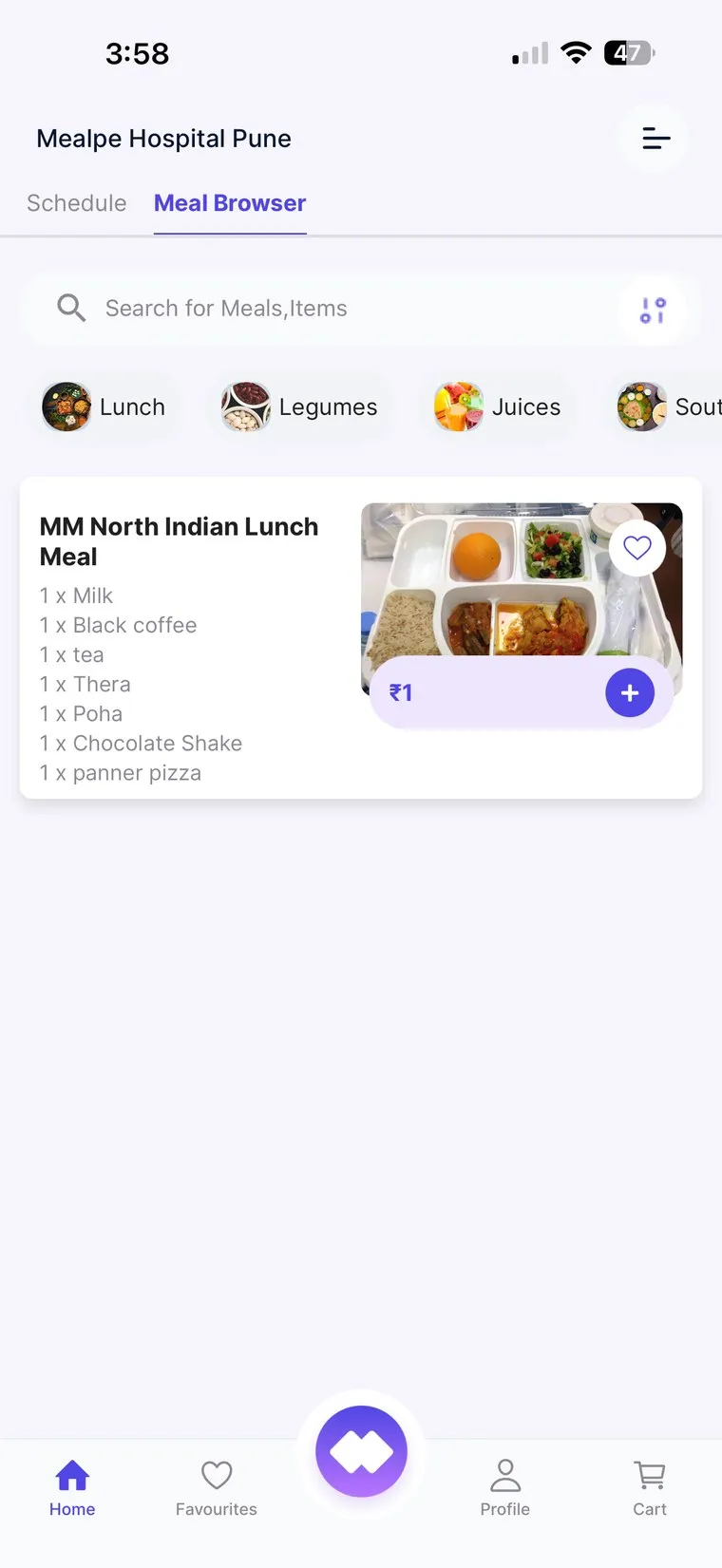
MedMeals patient and attendee app showing the meal browser with categories and a North Indian lunch meal

The meal browser, with categories and set meals

Attendees need meals too, and the canteen was not built for them

In Indian hospitals a patient is rarely alone. An attendee, usually a family member or caretaker, stays by the bed, often for the whole admission, and needs three meals a day as well. Today that means leaving the patient to queue at the canteen, paying cash at a counter, or ordering from outside apps and waiting at the gate for a rider.

For the hospital, those meals are invisible. The kitchen cannot plan for them, cash has to be counted and reconciled, and outside food ends up on the bedside table next to a patient whose diet the family may not fully understand.

A food ordering app made for the hospital bedside

The MedMeals app gives attendees and families a proper way to order from the hospital's own kitchen, while the hospital keeps control of patient diets and a clean record of every sale.

  • A menu of their own for attendees

    Attendees order from a paid menu that the hospital prices and manages. It sits apart from patient menus, so a family meal is never confused with a therapeutic one.

  • Browse by category or search

    Meals and items are grouped into categories such as lunch, legumes or juices, with a search bar for anything specific and the full contents listed on each set meal.

  • Delivered to the bed, now or later

    Each order carries the ward and bed number. Attendees can order for right away or schedule a delivery time for later in the day.

  • UPI and card payments

    Attendees pay for their own meals by UPI or card. Their orders are settled separately from the patient's hospital bill, and every transaction is logged.

  • Families can order the patient's meals

    Relatives at home or at work can order a patient's meals in advance from any device. They only see the patient's diet-safe menu, so a well-meant order cannot break the diet.

  • Live status and an OTP at handover

    The app shows every stage of the order until the tray is cleared. The attendee shares one OTP when the tray is handed over and a second when it is collected.

  • QR codes for one-scan updates

    Each attendee order carries a QR code. One scan by kitchen or delivery staff updates the status, and the attendee sees it change in the app.

How an attendee order reaches the bed

  1. Step 1: Browse the menu

    The attendee opens the hospital's menu on their phone and browses by category or searches for a dish.

  2. Step 2: Add to cart

    The ward and bed go with the order, and the attendee chooses to order now or schedule a time.

  3. Step 3: Pay

    The attendee pays by UPI or card, and the order is settled separately from the patient's bill.

  4. Step 4: The kitchen prepares it

    The order joins the kitchen queue alongside patient orders and is prepared, plated and sent to the ward.

  5. Step 5: Handover and clearance

    The attendee gives the delivery OTP when the tray arrives, and the clearance OTP when it is collected.

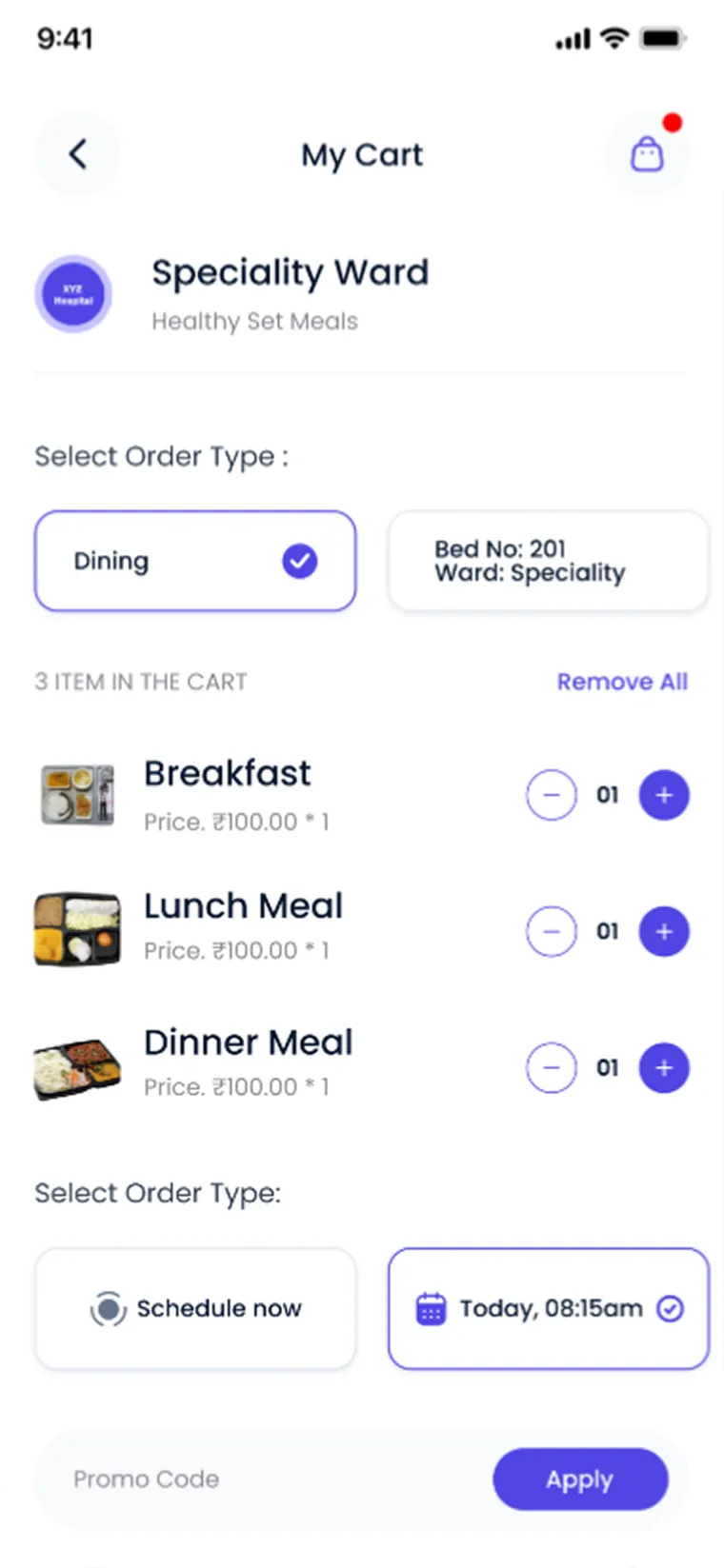
A cart that knows the bed

The cart shows the ward the meals are for and the bed they go to. Breakfast, lunch and dinner can sit in one cart, and the attendee can order for now or pick a delivery time that suits their day at the hospital.

  • Ward and bed attached to every order
  • Order now or schedule a delivery time
  • Several meals in one cart
MedMeals app cart for a speciality ward with breakfast, lunch and dinner meals, bed number and scheduled delivery time

Cart with the bed, ward and a scheduled delivery time
No calls to ask where the food is

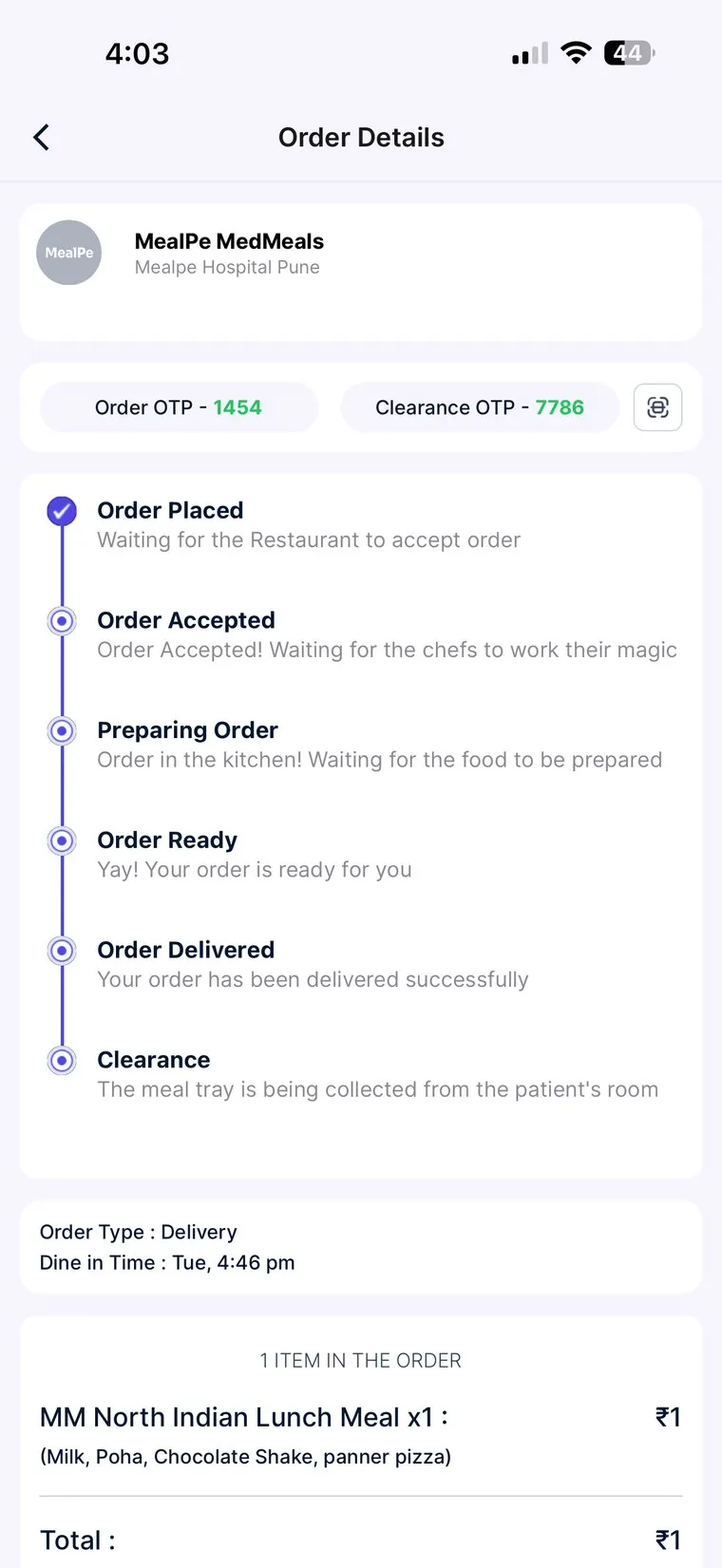
Once the order is placed, the attendee follows it in the app. Each stage has a short note in plain words, right through to clearance, and both OTPs sit at the top of the screen.

  • Six stages, each with a plain-language note
  • Delivery OTP and clearance OTP on the order
  • Items and total listed below the timeline
MedMeals app order details with order OTP, clearance OTP and a live status timeline from order placed to clearance

Order details with live status and both OTPs

Attendee meals without an app versus with MedMeals

Paper versus MedMeals
Attendee meals without an app versus with MedMeals
Area On paper With MedMeals
Getting a meal Queue at the canteen and leave the patient alone Order from the bedside on a phone
Paying Cash at a counter, counted by hand UPI or card, with every transaction logged
Ordering for the patient Families guess what the patient is allowed Families only see the patient's diet-safe menu
Kitchen planning Attendee demand unknown until the queue forms Attendee orders in the same queue as patient meals
Order status Calls to the canteen to ask where the food is Live status in the app, from placed to cleared

What changes when attendees order in the app

  • Attendees stay with the patient

    Meals come to the bed, so the person caring for the patient does not have to leave the ward to find food.

  • Every attendee sale on record

    Each paid order is itemized and logged, so attendee meals are simple to reconcile and report on.

  • Diets safe from well-meant orders

    Families ordering for a patient only see what the diet allows, so a kind gesture never turns into a diet error.

  • Fewer calls to the kitchen

    Live status answers the question of where the food is, so kitchen and nursing staff are not pulled away to chase orders.

Questions buyers ask

Still have a question? Ask our team or call +91 79845 98296.

What is a hospital food ordering app?

It is an app that lets people in a hospital, usually attendees and families, order meals from the hospital's own kitchen on their phones. MedMeals adds diet control: a family ordering for a patient sees the patient's diet-safe menu, not the full list.

Who counts as an attendee?

An attendee is a family member or caretaker who stays with a patient during the hospital stay. In Indian hospitals attendees often stay for days, so they need regular meals of their own.

How do attendees pay for their meals?

Attendees pay for their own meals by UPI or card. These orders are settled separately from the patient's hospital bill, and every transaction is logged and exportable for the finance team.

Can families order food for the patient from home?

Yes. Through online ordering, patients or families can order meals in advance from any device. They order from the patient's own menu, so anything outside the diet, or containing a recorded allergen, never appears.

How does an attendee know when the food will arrive?

The app shows each order's live status as it moves from placed and accepted through preparing and ready to delivered and cleared. Changes are pushed in real time, so there is no need to call the kitchen or the canteen.

Can the hospital set its own attendee menu and prices?

Yes. Paid attendee menus are configured by the hospital alongside patient menus, with their own items, categories and prices, and meal windows for breakfast, lunch, dinner and snacks.

See the attendee app from the family's side

Book a demo and we will walk through an attendee order on a phone, from browsing the menu to paying and sharing the OTP at the bedside.

Demo request Reply within one working day

Request a personalized demo

Your role (tick one)

We will only use your details to arrange the demo. See the privacy policy.