Meal billing Bed 12

Hospital meal billing software, from bedside order to final bill

Every meal ordered in MedMeals becomes an itemized charge on the right account. Patient meals roll into the final bill, attendees pay by UPI or card, and cashless insurance-borne settlement is supported. Every transaction is logged and exportable.

Patient meals
Added to the final bill
Attendee meals
Paid by UPI or card
Invoice
Itemized from orders
Transactions
Logged and exportable

Meals get served and never billed

In many hospitals, meal charges are pieced together at discharge. The billing desk counts entries in the diet register, checks them against kitchen slips and adds a line to the final bill. Extras, late orders and attendee meals slip through, and a family may pay cash at the canteen with no link to the admission at all.

At month end, finance tries to match what the kitchen cooked with what was billed and collected. Without an order behind each charge, questions from patients, insurers and auditors turn into arguments about paper.

Billing that comes straight from the orders

In MedMeals, a charge exists because an order exists. Invoices, settlements and reports all read from the same order pipeline.

  • Itemized invoices from actual orders

    Invoices are generated automatically from the orders placed, item by item, so every charge can be traced back to a meal.

  • Per patient, attendee or department

    Invoice each patient for their meals, each attendee for theirs, or a department for the orders placed on its behalf.

  • Straight into the final bill

    Patient meal charges roll into the patient's final bill, so discharge billing does not depend on a tally from the kitchen.

  • Hospital billing, UPI and cards

    Settle meal charges through hospital billing, UPI or cards, whichever fits the order and the person paying.

  • Cashless, insurance-borne settlement

    For patients on cashless insurance, meal charges can be settled as insurance-borne instead of being collected from the family.

  • Attendee orders settled separately

    Attendee meals can be paid for by the attendee, by UPI or card, and settled separately instead of being added to the patient's account.

  • Every transaction logged and exportable

    Each charge, payment and settlement is logged. Export them for finance, reconciliation and audits.

How a meal becomes a line on the bill

  1. Step 1: An order is placed

    Whether it starts at the bedside, in the attendee app or at the admin desk, the order records who it is for and what it costs.

  2. Step 2: The charge goes to the right account

    Patient meals are charged to the patient, attendee meals to the attendee, and orders placed for a department to that department.

  3. Step 3: Paid now or carried forward

    Attendees pay by UPI or card. Patient meals can be carried forward and settled on the final bill.

  4. Step 4: The invoice is itemized

    Invoices list each meal and item from the actual orders, with no charges typed in by hand.

  5. Step 5: Settlement and export

    Charges settle through hospital billing, UPI, cards or cashless insurance, and every transaction can be exported for finance.

A billing summary on every patient

The patient view opens on orders and billing. Four figures sum up the stay so far: total orders, total billing, amount paid and amount pending. Below them, each recent order shows its payment mode, the scheduled date and time, the items and the price.

  • Total orders, billing, paid and pending
  • Payment mode on each order, such as cash or carry-forward
  • Admission and discharge dates in the header
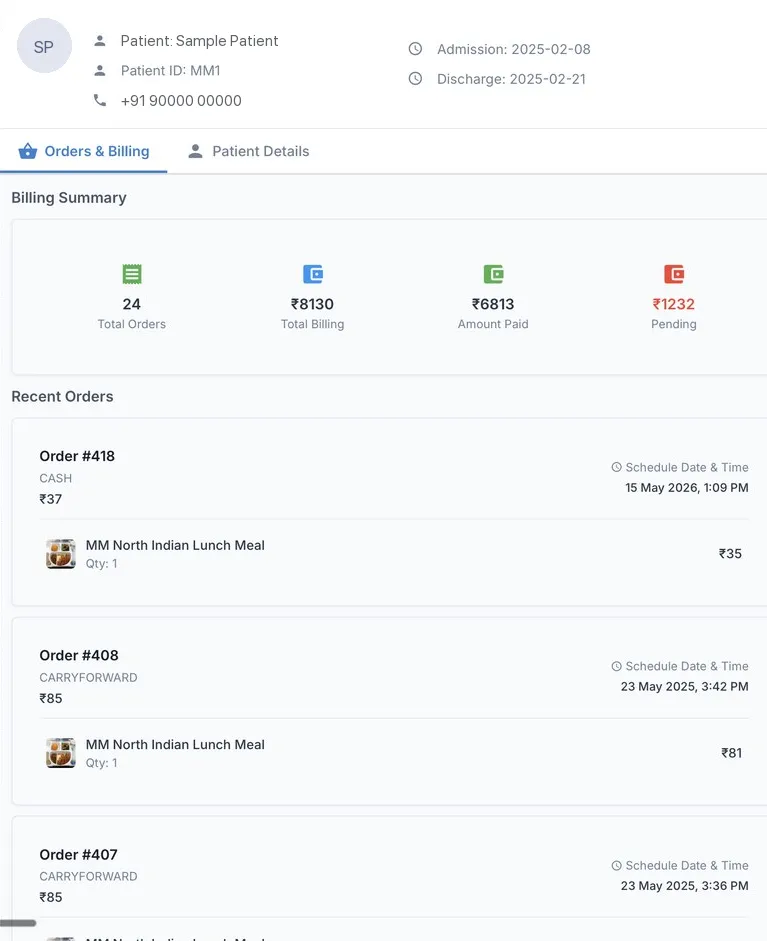
Patient billing summary
Patient billing summary in MedMeals with total orders, total billing, amount paid, pending amount and recent orders (sample patient)

Patient billing summary with recent orders
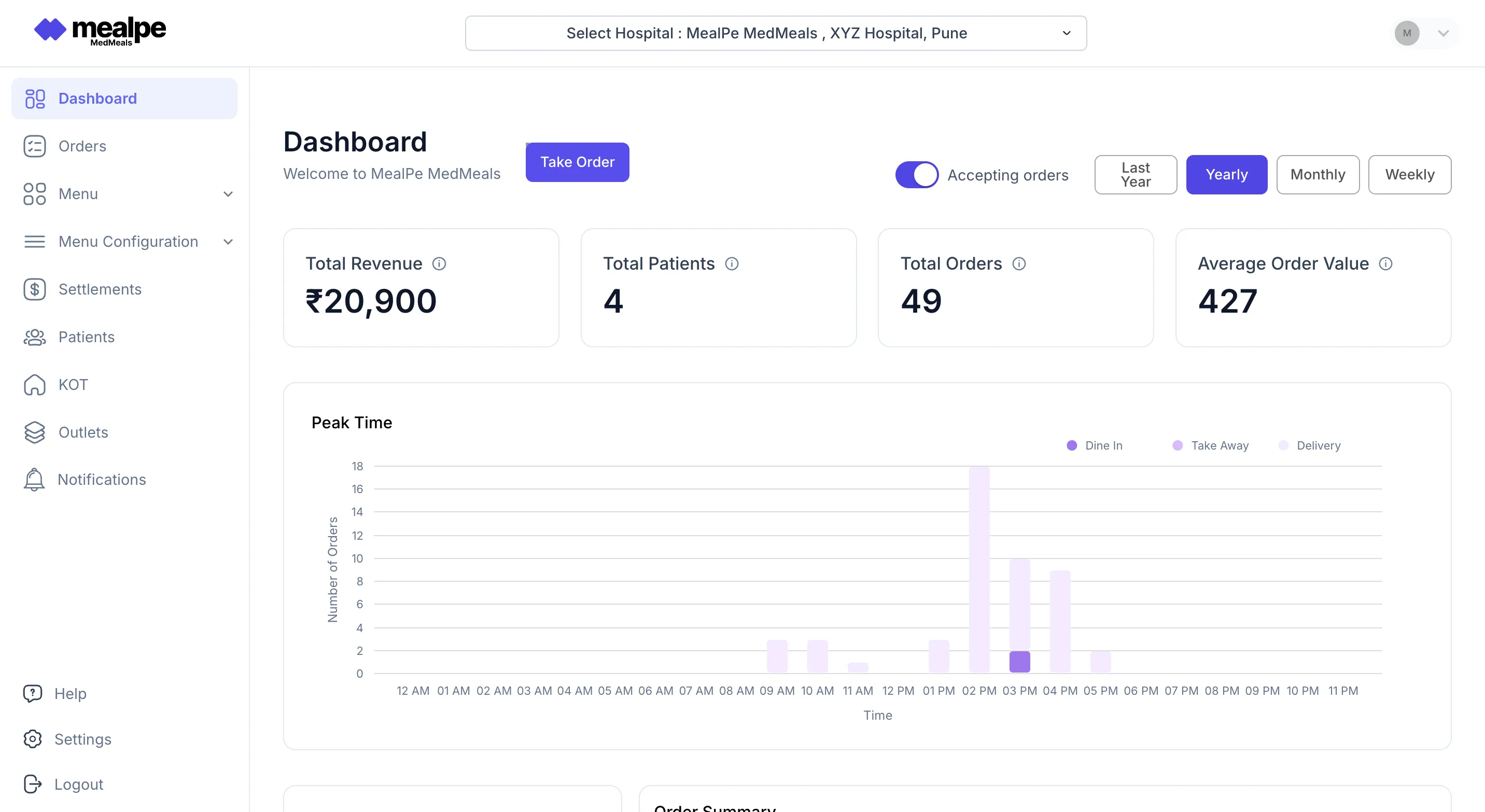
Revenue at a glance

The admin dashboard shows total revenue, total patients, total orders and average order value, with weekly, monthly and yearly views and a chart of orders by hour. Finance and F&B managers work from the same orders the kitchen cooked.

  • Total revenue and average order value
  • Weekly, monthly and yearly views
  • Orders by hour on a peak-time chart
Admin dashboard
MedMeals admin dashboard showing revenue, patients served, total orders and a peak-time chart of orders by hour

Admin dashboard with revenue and order totals

Meal billing on paper versus MedMeals

Paper versus MedMeals
Meal billing on paper versus MedMeals
Area On paper With MedMeals
Meal charges Counted from registers at discharge Built from actual orders as they are placed
Invoice detail One lump sum for food Itemized by meal and item
Attendee meals Cash at the canteen, unlinked to the stay Paid by UPI or card and logged
Insured patients Food charges added to the claim by hand Cashless insurance-borne settlement supported
Reconciliation Kitchen slips matched to receipts by hand Every transaction logged and exportable
Pending dues Discovered at discharge Amount pending shown on each patient

What changes when billing reads from the orders

  • Billing, automated

    Invoices are produced from orders without anyone keying in meal charges, from the first order to the final bill.

  • Every order reaches the bill

    Each meal ordered creates its own charge, so meals do not slip through unbilled.

  • Discharge without the hunt

    Meal charges are already on the patient's account at discharge, so nobody rebuilds them from registers.

  • An audit trail for every rupee

    Every transaction is logged and exportable, ready for finance reconciliation and internal audits.

Questions buyers ask

Still have a question? Ask our team or call +91 79845 98296.

What is hospital meal billing software?

It is software that turns meal orders into charges and invoices. MedMeals generates itemized invoices from actual orders for each patient, attendee or department, rolls patient meal charges into the final bill and logs every transaction.

Can meal charges go on the patient's final hospital bill?

Yes. Patient meal charges roll into the patient's final bill. How they reach your billing system is set up in the Integration step of rollout, which connects MedMeals with your HIMS or HMS and billing systems.

Are attendee meals kept off the patient's bill?

They can be. Attendee orders can be settled separately by UPI or card, so the attendee pays for their own meals and the patient's account carries only the patient's meal charges.

Does MedMeals support cashless insurance patients?

Yes. MedMeals supports cashless, insurance-borne settlement of meal charges alongside hospital billing, UPI and cards. Your onboarding manager maps this to your existing billing process during rollout.

Can we invoice a department instead of a patient?

Yes. Invoices can be generated per patient, per attendee or per department, so orders placed on a department's behalf are billed to that department.

Can MedMeals handle billing for a hospital canteen?

Yes, for meals ordered through MedMeals. Canteens are set up as facilities, attendee and visitor orders are paid by UPI or card, and each sale is itemized and logged with the rest of your meal billing.

Can we export billing data for finance?

Yes. Every transaction is logged and exportable, and financial reports cover revenue, outstanding amounts and settlements, so finance can reconcile meal billing without asking the kitchen for slips.

See a meal turn into a line on the final bill

Book a demo and we will place orders for a patient and an attendee, then show how each one is billed, paid and exported.

Demo request Reply within one working day

Request a personalized demo

Your role (tick one)

We will only use your details to arrange the demo. See the privacy policy.