Lunch service Main kitchen

Hospital food service software for F&B managers and kitchen teams

Clean orders in, clean KOTs out. MedMeals gives F&B managers and kitchen supervisors one queue for every ward and channel, KOTs and meal cards by station, dispatch confirmed by QR and OTP, and a clear view of billing, forecasts and waste.

Queue
Every ward, every channel
KOTs
Consolidated by station
Dispatch
QR scan, OTP at the bed
Close
Billed and settled

The kitchen should cook, not decode

Before every meal someone in the F&B team collects diet lists from each floor, counts portions by hand, rewrites them for each station and hopes nobody calls in a change. After the meal someone else chases which beds were served so billing can catch up.

None of that is cooking. It is reconciling, and it happens because orders arrive as phone calls, slips, register entries and messages. MedMeals gives your team one format for every order, so the kitchen's time goes into the food.

From order to settlement in one system

  • One queue for every channel

    Whether an order was taken on a ward tablet, placed by a family online, paid for in the attendee app or entered by an admin, it reaches the kitchen in one format, with bed, ward and meal slot.

  • KOTs consolidated by station

    Orders roll up into KOTs routed to the kitchen station that makes them, so each station works from its own production list.

  • Daily meal cards

    A meal card for every patient and meal slot lists exactly what to prepare and deliver, printed in batches or shown on screen.

  • Production planned by meal window

    Every order carries its meal slot, and breakfast, lunch, dinner and snack windows are set in the menus, so production is planned service by service.

  • Dispatch with QR and OTP

    Staff scan the order QR to update status as trays move, the delivery OTP confirms each handover and the clearance OTP closes the order.

  • Billing without re-entry

    Each served order becomes an itemized charge on the patient's bill, the attendee's payment or a department invoice, with every transaction exportable.

  • Forecast, waste and cost trends

    Compare forecast with actual meals and follow waste and cost trends over time, so tomorrow's production plan starts from real numbers.

  • Diet changes that reach the stove

    When a dietitian changes a diet, the kitchen gets a real-time alert, and the next KOT for that bed already shows the new diet.

Every order and every state on one screen

Supervisors run the shift from the current orders view. Each row shows what was ordered, where it goes, when it is due and what it is worth, and the accept, start preparing and Print KOT actions sit on the same row. Tabs follow every order from pending through clearance to history.

  • Orders from every ward and channel together
  • Preparation time and delivery time per order
  • Tabs from pending through clearance to history
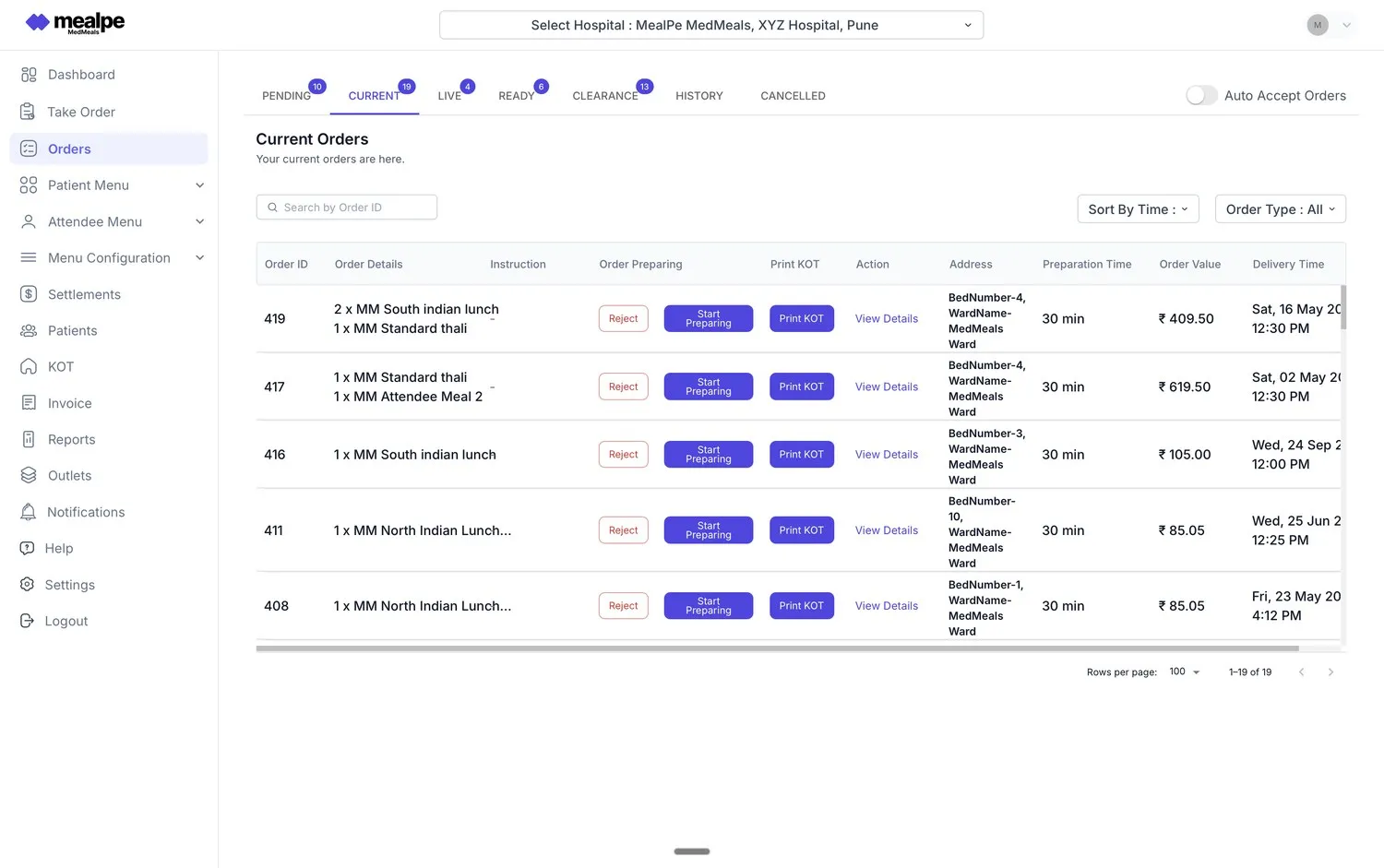
Kitchen order queue
MedMeals current orders queue with bed and ward addresses, preparation time, order value and Print KOT buttons

The kitchen's current orders queue

A clean plan for every cook

Meal cards and KOTs name the diet, bed, ward and meal slot, so a cook in the diet kitchen never has to guess what a line on a slip meant. Diet changes arrive as alerts, and the next ticket already reflects them.

  • KOTs routed to the right station
  • Meal cards per patient and slot
  • The diet named on every ticket
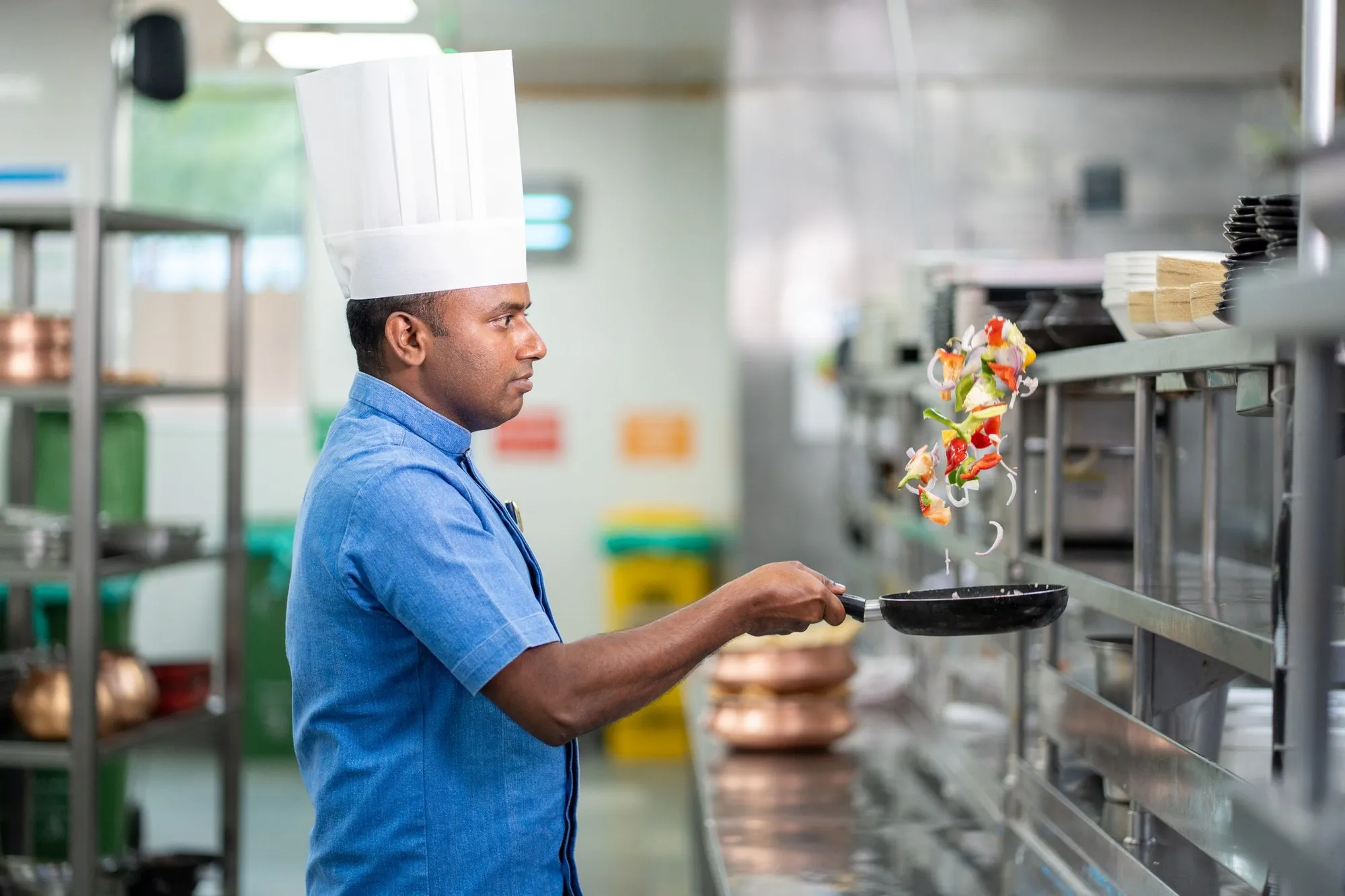
Indian chef tossing vegetables in a pan in a clean stainless steel commercial kitchen

Cooks work from KOTs, not handwritten slips

Dispatch you can prove

Each tray leaves the pass with a QR code. Every scan updates the status that the ward and the family see, a delivery OTP at the bed proves the handover, and a clearance OTP proves the tray came back.

  • Live status from placed to cleared
  • Delivery OTP at the bedside
  • Clearance OTP when the tray returns

A kitchen supervisor's day with MedMeals

One service after another, run from the queue instead of the phone.

Duty roster A day with MedMeals
  1. 06:30

    Breakfast production

    Advance orders and ward orders are consolidated into KOTs by station, with a meal card for each patient. Cooks start from counts, not slips.

  2. 08:00

    Breakfast dispatch

    Trays leave with QR codes. Delivery staff scan as they go, and each bedside handover is confirmed with the delivery OTP.

  3. 10:30

    A diet change from rounds

    A diet-change alert comes in for bed 7. Lunch for that bed is prepared to the new diet, and nobody had to pick up the phone.

  4. 12:15

    Lunch rush

    The live queue shows pending, preparing and ready orders from every ward and the attendee app, so the pass knows what goes out next.

  5. 15:00

    Clearance and settlement

    Clearance OTPs close the lunch orders. Attendee orders paid in the app are already settled, and patient charges are waiting on their bills.

  6. 17:30

    Plan tomorrow

    Check forecast versus actual and the waste and cost trends before setting tomorrow's production plan.

What changes in the kitchen

  • Automation of cards, KOTs and billing

    Meal cards, KOTs and invoices come from the orders themselves, so nobody rewrites them before a meal or after it.

  • Fewer meal-service errors

    Tickets carry the diet, bed and ward from the original order, so fewer trays are built wrong or sent to the wrong bed.

  • Every meal billed

    A served order is a billed order: charges reach the patient's bill, the attendee's payment or the department invoice without re-entry.

  • A complete digital audit trail

    Orders, dispatch scans, OTPs and transactions are logged, so questions from the wards or from finance are answered from the record.

Questions buyers ask

Still have a question? Ask our team or call +91 79845 98296.

What is hospital food service software?

Hospital food service software runs the operational side of patient and attendee meals: taking orders from wards and families, producing KOTs and meal cards, dispatching and verifying delivery, and billing and reporting. MedMeals is food service management software built for hospitals, with every step linked to the patient's diet.

What is a KOT in a hospital kitchen?

A KOT (kitchen order ticket) tells a kitchen station what to prepare. In MedMeals, KOTs are consolidated for each station from all incoming orders, and together with the daily meal card for each patient they name the diet, bed and ward, so every tray is plated correctly. They can be printed or shown on a kitchen screen.

How does the kitchen find out about diet changes?

Through an alert, not a phone call. The moment a diet is changed on the patient's record, the kitchen receives a real-time diet-change alert, and any order placed after that shows the new diet on its KOT and meal card.

How do we confirm that a tray was delivered?

Two ways at once. The order's QR code is scanned as the tray moves, so its status is always current, and the bedside handover is confirmed with a delivery OTP. When the tray comes back, a clearance OTP closes the order.

Can we see forecast versus actual and food waste?

Yes. Operational reports put forecast and actual meals side by side and track waste and cost over time, so the next production plan can be adjusted. Financial reports cover revenue, outstanding amounts and settlements.

Can a diet kitchen and a main kitchen run side by side?

Yes. Each kitchen and station is set up in the masters, and consolidated KOTs are routed to the station that prepares them, so a diet kitchen and a main kitchen each see their own work.

We are an outsourced caterer. Is MedMeals for us?

Yes. MedMeals works the same way for contract caterers and in-house F&B teams, with roles and permissions that separate the caterer's staff from the hospital's clinical and admin teams.

See a full meal service run through MedMeals

Book a demo and we will take one meal service from ward orders to KOTs, dispatch, clearance and billing, using your stations and meal windows.

Demo request Reply within one working day

Request a personalized demo

Your role (tick one)

We will only use your details to arrange the demo. See the privacy policy.