IPD patient Ward 4B, Bed 12

IPD patient meal management from admission to discharge

Every inpatient gets one record with admission details, ward and bed, treating unit and diet order. Meals follow that record through bed transfers, diet changes and meal holds, and the full meal history stays on file after discharge.

Admitted
Via HIMS sync
Treating unit
Cardiology
Diet
Cardiac, low sodium
Dietitian
Assigned on admission

Meals lose track of patients who move

An inpatient rarely stays put. They are admitted to one ward, shifted to the ICU after a procedure, stepped down to another bed, kept nil by mouth before surgery and finally discharged, sometimes within a few days. Each move is a chance for the kitchen to lose track of where the patient is and what they can eat.

On paper, the diet register and the bed census are separate lists kept by different people. Trays go to beds that were vacated in the morning, discharged patients stay on the kitchen's list, and a new admission can wait a meal before anyone in the kitchen knows they are there.

One inpatient record that every meal reads from

IPD patient management ties each admission to a ward, a bed and a diet, so every order, KOT and bill is built from the same facts.

  • Complete IPD patient details

    Demographics, admission data, ward and bed, treating unit and diet orders sit on one record that ordering, the kitchen and billing all use.

  • Admit manually or via HIMS sync

    Add a patient by hand, or bring admissions in through a sync with your HIMS or HMS. Either way the patient is ready for diet setup.

  • A dietitian on every admission

    Each new patient is assigned a dietitian, who sets up the diet, allergies and texture so the menu is right before the first order.

  • Transfers that carry the diet

    Move a patient to another bed or ward and the diet profile goes with them. The next meal goes to the new bed without anyone re-entering the diet.

  • Meal holds when care requires them

    Put a patient's meals on hold, for example before a procedure, and resume them when the treating team says the patient can eat.

  • Discharge with the history kept

    Discharge ends the patient's meal service, while the full meal history stays on the record for billing queries and audits.

  • Meals linked to the final bill

    Every meal ordered for the patient is tied to their record, so meal charges roll into the final bill at discharge.

An inpatient's meals, from admission to discharge

  1. Step 1: Admission

    The patient is added manually or arrives through the HIMS sync, with ward, bed and treating unit.

  2. Step 2: Diet setup

    The assigned dietitian records the diet order, texture and allergies, and the patient's menu filters to match.

  3. Step 3: Daily meals

    Orders from the bedside tablet, the family or the admin desk are all checked against that diet.

  4. Step 4: Transfers and holds

    If the patient changes bed or ward, the diet moves too. If meals must pause, they are put on hold until the patient can eat again.

  5. Step 5: Discharge

    The patient is discharged, meal charges roll into the final bill and the full meal history stays on file.

The whole stay on one patient view

The patient view brings the stay together: admission and discharge dates in the header, every order placed during the stay, and a running summary of what has been billed, what has been paid and what is still pending. The billing desk and the dietitian look at the same record.

  • Admission and discharge dates on the record
  • Each order with its date, time, items and price
  • A running billing summary for the stay
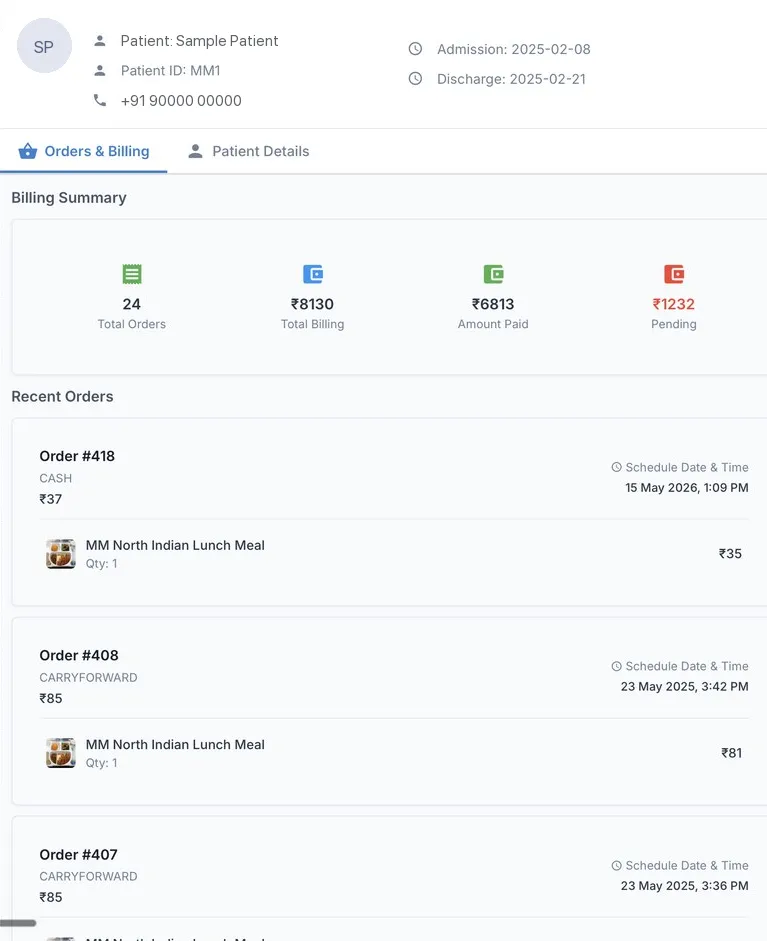
Patient billing summary
Patient billing summary in MedMeals with total orders, total billing, amount paid, pending amount and recent orders (sample patient)

Patient view with orders and a billing summary

Admissions that arrive without a phone call

When MedMeals is connected to your HIMS, new admissions and patient details come through the sync, so the kitchen does not wait for a slip from the ward. Hospitals without a connection admit patients manually, and the dietitian and diet steps that follow work exactly the same way.

  • Admission via HIMS sync or manual entry
  • Dietitian assigned and diet set up
  • Transfers and discharges reflected on the meal record

Inpatient meals on registers versus MedMeals

Paper versus MedMeals
Inpatient meals on registers versus MedMeals
Area On paper With MedMeals
New admission Kitchen told by phone, sometimes a meal late On the record at admission, manually or via HIMS
Diet order Kept in a diet register, apart from the bed census Stored on the same record as the ward and bed
Bed transfer Trays sent to the old bed until someone calls Diet profile moves with the patient to the new bed
Meal hold A note on the ward that the kitchen may not see Meals put on hold on the patient's record
Discharge Patient left on the kitchen list after going home Meal service ends and the history is kept
Meal history Scattered across registers and slips One full history per stay, ready for audits

What changes when meals follow the patient

  • The right bed after every move

    Transfers carry the diet profile, so meals go to where the patient is now, on the diet they are on now.

  • Fewer meal-service errors

    Diet, bed and admission live on one record, so there is no second list to fall out of date.

  • A kitchen list that matches the ward

    Admissions, transfers and discharges update the meal record, so the kitchen cooks for the patients who are actually on the ward.

  • A complete stay on file

    Every diet, transfer, hold and meal is kept on the patient's record, ready for NABH and internal audits.

Questions buyers ask

Still have a question? Ask our team or call +91 79845 98296.

What is IPD patient meal management?

It is the part of hospital food service that follows each inpatient's meals through the stay: admission, diet order, daily meals, transfers, holds and discharge. MedMeals keeps all of it on one record, so every order, KOT and bill uses the patient's current ward, bed and diet.

How are new inpatients added to MedMeals?

Patients can be added manually or brought in through a sync with your HIMS or HMS. During onboarding a dietitian is assigned and the diet is set up, so the patient's menu is ready before the first order.

What happens to a patient's diet during a bed transfer?

The diet profile moves with the patient. Once the transfer is recorded, orders go to the new ward and bed with the same diet, allergies and texture, so nothing needs to be entered again.

Can meals be put on hold, for example before surgery?

Yes. Meals can be held on the patient's record and resumed later. The decision to stop or restart feeding, such as a nil by mouth order before a procedure, is made by the treating doctor or dietitian.

What happens at discharge?

Discharge ends the patient's meal service. Meal charges roll into the final bill, and the full meal history, including diets, transfers and every order, stays on file for billing queries and audits.

Can we see every meal ordered during a stay?

Yes. Each record keeps the orders placed during the stay, with dates, times, items and prices, next to a summary of what has been billed, what has been paid and what is still due.

Follow one inpatient through MedMeals

Book a demo and we will admit a sample patient, set a diet, transfer them to another ward and discharge them, so you can watch every meal follow along.

Demo request Reply within one working day

Request a personalized demo

Your role (tick one)

We will only use your details to arrange the demo. See the privacy policy.