Bedside order RSOT tablet

Hospital meal ordering system that takes orders at the bedside

Ward staff take each patient's meal order on a tablet during rounds, from a menu that already knows the diet. The order reaches the kitchen queue with the bed, ward and meal slot attached. No order sheets to carry, no calls to the kitchen.

Bed
Ward 4B, Bed 12
Diet
Diabetic
Meal slot
Lunch
Status
In the kitchen queue
RSOT take order
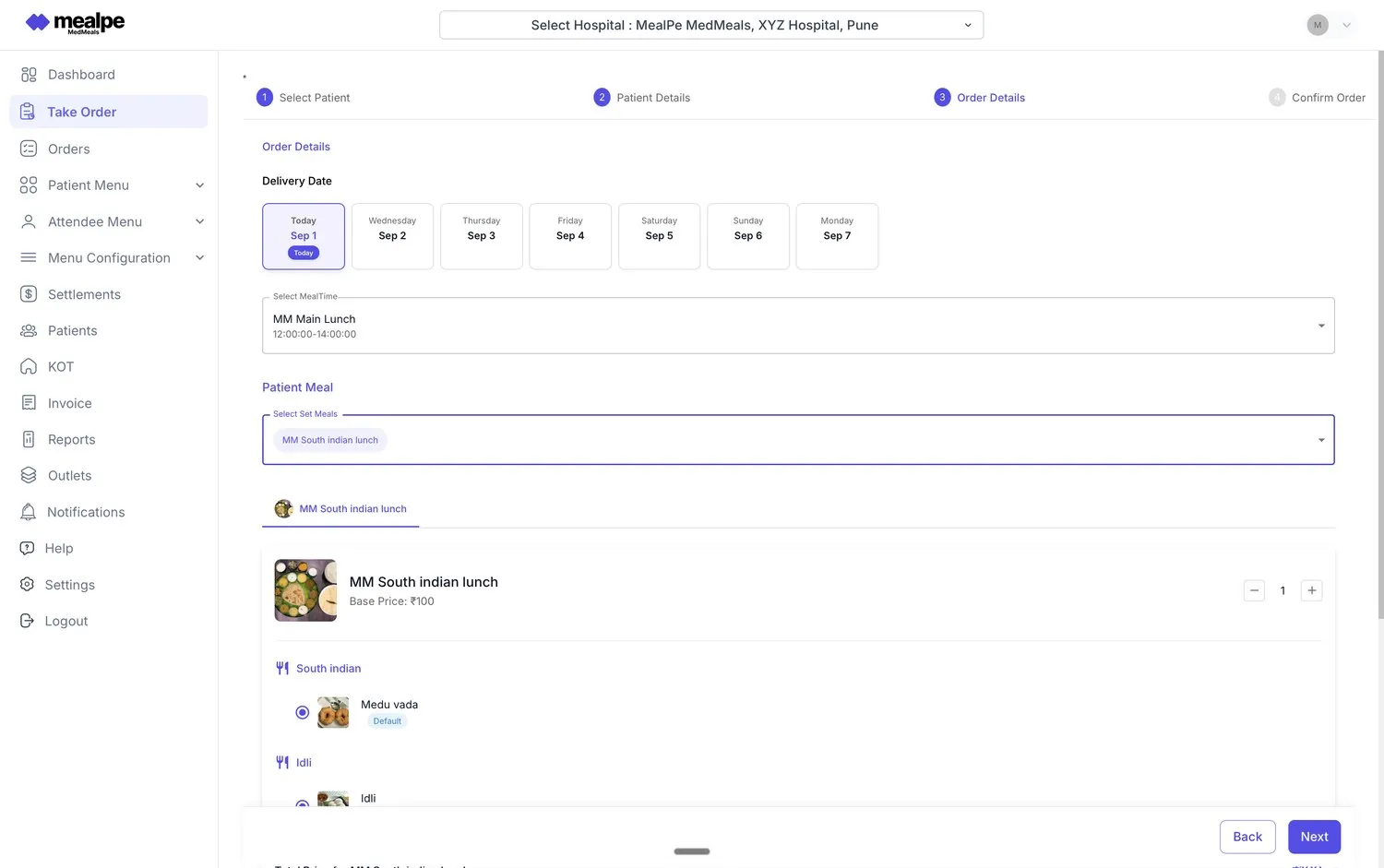
Room Service Order Taking screen in MedMeals: select patient, choose delivery date and meal time, then pick the patient meal

The RSOT take-order screen, from patient to meal

Meal orders get lost between the ward and the kitchen

On most wards, meal orders still travel on paper. A diet assistant walks the ward with a clipboard, notes each bed's choices and carries the sheet down to the kitchen. Anything added later goes by phone, and the kitchen cooks from handwriting, guessing at what changed after the sheet was written.

The person taking the order has no easy way to check a diet at the bedside. If the diet changed on the morning round, the sheet does not know. Late orders miss the meal slot, patients are asked the same questions twice, and nobody can say which orders reached the kitchen until the trays go out.

Everything a bedside order needs, on one tablet

RSOT (Room Service Order Taking) puts the order sheet, the patient's diet and the kitchen's intake on one screen, so each order is taken right the first time.

  • Orders taken on ward rounds

    Staff carry a tablet on rounds and take each patient's order at the bedside, bed by bed, instead of writing choices on a sheet to copy out later.

  • Only diet-safe choices on screen

    The tablet opens the patient's own menu. Items that break the diet or contain a recorded allergen are not shown, so they cannot be picked by mistake.

  • A date and meal slot on every order

    Choose today or a later date, then the meal time, such as breakfast, lunch or dinner. Meals can be ordered in advance for the days a patient will stay.

  • Set meals with choices inside

    Offer the hospital's set meals with their options laid out, such as idli or medu vada in a South Indian lunch, with a default already selected.

  • Straight into the kitchen queue

    A confirmed order appears in the kitchen's live queue with the bed, ward and meal slot, ready to accept, prepare and print as a KOT.

  • Admin ordering for wards

    Administrators can place, adjust or bulk-manage orders for wards, and those orders join the same queue as the ones taken at the bedside.

  • A QR code and live status on every order

    Each bedside order carries its own QR code and live status, from placed to cleared, so the ward can see where it is without calling the kitchen.

How a bedside order reaches the kitchen

  1. Step 1: Select the patient

    On the ward round, staff select the patient on the tablet before taking the order.

  2. Step 2: Check the patient details

    Staff check the patient's details on screen, so the order is tied to the right person and the right bed.

  3. Step 3: Choose the date, meal time and meal

    Staff pick the delivery date and meal slot, then the set meal and its options. Only items that suit the diet are offered.

  4. Step 4: Confirm the order

    The order is confirmed at the bedside and joins the kitchen queue with the bed, ward and slot attached.

  5. Step 5: The kitchen takes it from there

    The kitchen accepts the order, prepares it and prints the KOT, and its status stays visible until the tray is cleared.

Four ways to order, one kitchen queue

Bedside RSOT is one of four ways an order can start. Attendees order and pay in the app, patients or families order ahead online, and administrators place or bulk-manage orders for wards. All four land in the same pipeline, so the kitchen works from one queue and one dashboard.

  • RSOT by ward staff on tablets
  • Attendee self-ordering in the app
  • Online ordering by patients or families
  • Admin ordering for wards

Sample data

Built around the ward round

The order screen follows the round in four steps: select the patient, check the details, choose the order, confirm. Delivery dates cover today and the days ahead, meal times show their serving windows, and set meals open with their options and a default already picked.

  • Select patient, patient details, order details, confirm
  • Delivery date for today or the days ahead
  • Meal times shown with their serving windows
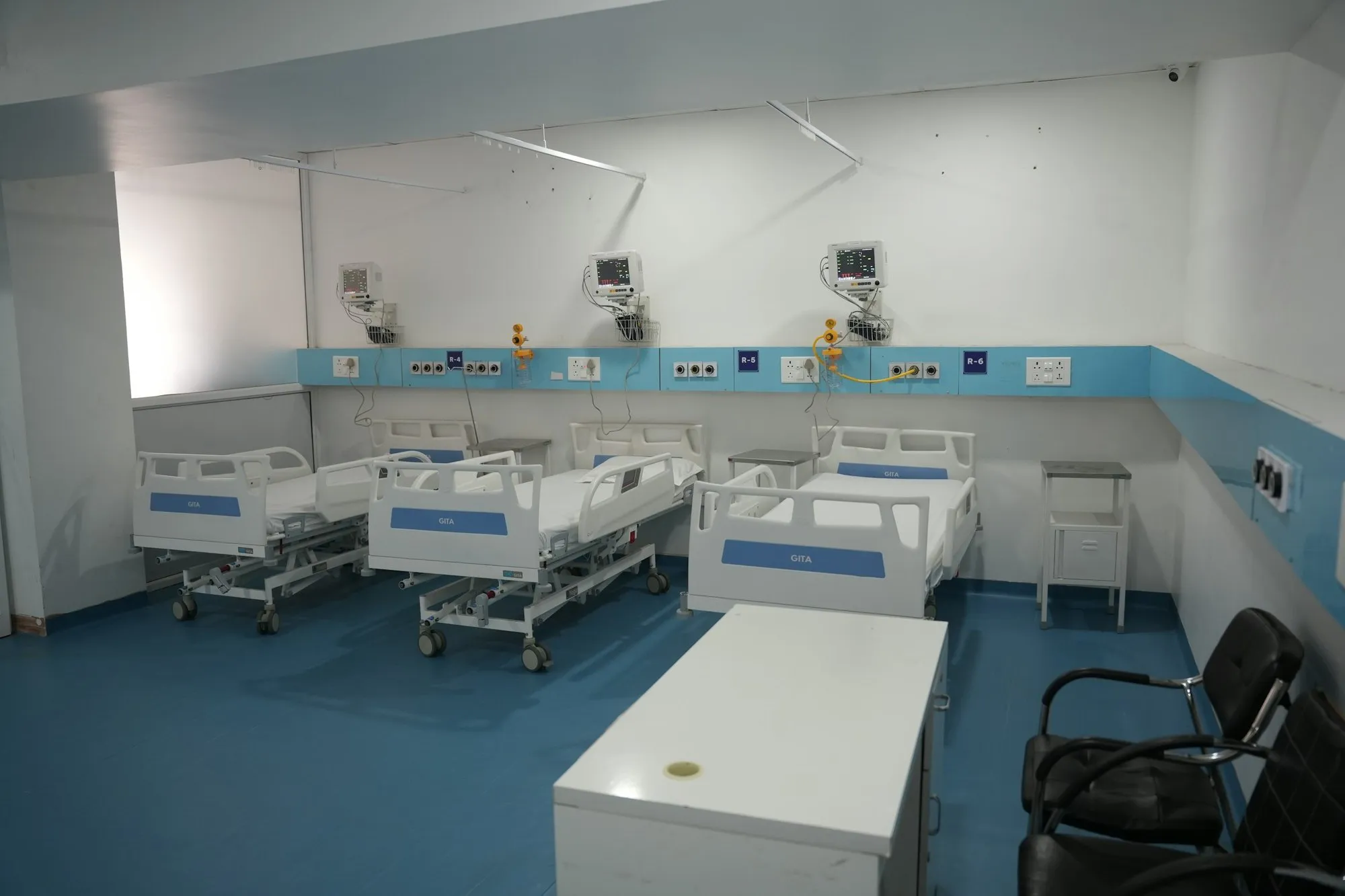
Clean multi-bed hospital ward in India with made-up beds and wall-mounted monitors

Orders are taken bed by bed, on the round

Bedside ordering on paper versus MedMeals

Paper versus MedMeals
Bedside ordering on paper versus MedMeals
Area On paper With MedMeals
Taking the order Choices written on a ward sheet and carried to the kitchen Entered on a tablet at the bedside and sent straight to the queue
Diet check Depends on the order taker remembering the diet Only items that suit the patient's diet are offered
Late orders Phoned in, and easy to miss Added on the tablet into the same queue
Kitchen intake Handwriting read and copied into a production list Bed, ward and meal slot on every order in the queue
Order status Unknown until the tray reaches the ward Live from placed to cleared
Order record Sheets filed away or thrown out Every order stored against the patient

What changes when orders start at the bedside

  • 100% diet compliance at the point of order

    Staff can only choose items that satisfy the patient's diet, so a non-compliant meal is never ordered in the first place.

  • Fewer meal-service errors

    There is no sheet to copy, so bed numbers, choices and diets are not lost between the ward and the kitchen.

  • No order sheets to chase

    The kitchen works from one live queue instead of sheets, calls and messages, and every order has a status anyone can check.

  • An order history for every patient

    Each order is kept against the patient, ready for billing, reporting and audits.

Questions buyers ask

Still have a question? Ask our team or call +91 79845 98296.

What is a hospital meal ordering system?

A hospital meal ordering system records what each patient will eat, for which meal and bed, and sends it to the kitchen. In MedMeals, orders can start at the bedside, in the attendee app, online or at the admin desk, and every order is checked against the patient's diet.

What does RSOT stand for?

RSOT stands for Room Service Order Taking. Hospital staff visit each bed during ward rounds and take the patient's meal order on a tablet, much like hotel room service, except the menu is limited to what the patient's diet allows.

Can staff order meals for the coming days?

Yes. The order screen lets staff pick today or a later date along with the meal time, so meals can be ordered ahead for a patient's stay.

What happens if a diet changes after an order is placed?

Orders taken after the change follow the new diet, because every channel reads the diet from the patient's record. The kitchen and nursing get an alert when a diet changes, so an order already in the queue can be adjusted before it is cooked.

Can families order the patient's meals as well?

Yes. Patients or families can order ahead through online ordering, from the patient's own diet-safe menu, and attendees order their own paid meals in the app. Every channel feeds the same kitchen queue.

How does the kitchen receive bedside orders?

Confirmed orders appear in the kitchen's live order queue with the items, bed, ward and delivery time. Kitchen staff accept each order, start preparing it and print its KOT from the same screen.

Watch a bedside order travel to the kitchen

Book a demo and we will take an order on the RSOT tablet for one of your diets, then follow it into the kitchen queue and out to the bed.

Demo request Reply within one working day

Request a personalized demo

Your role (tick one)

We will only use your details to arrange the demo. See the privacy policy.