Diet management Menu engine

Hospital diet management software that enforces every diet order

Set a patient's diet once and MedMeals applies it everywhere: the bedside tablet, the family's phone, the kitchen's KOT and the discharge bill. Therapeutic rules, allergies and textures are enforced by the menu itself, not by memory.

Diet
Renal, low sodium
Allergy
Peanuts, hidden
Cycle
7-day rotation
Texture
Soft

Diet orders break when they live on paper

In most hospitals a diet order travels by hand. The doctor writes it, a nurse copies it into the diet register, the dietitian adjusts it on rounds and the kitchen reads it off a slip before breakfast. Every copy is a chance for renal to become regular, or for a peanut allergy to fall off the page.

Families add their own layer: food from the canteen, food from home, a menu card on the wall. Nobody can see what actually reached the tray until something goes wrong, and by then the only record is a register that three people have written in.

Diet rules the menu enforces for you

MedMeals turns each diet order into rules that every ordering channel respects, so compliance does not depend on who is on shift.

  • Therapeutic diets as rules

    Configure renal, cardiac, diabetic, liquid, soft and any other diet your protocols define. Each diet carries the rules that decide which items a patient can see and order.

  • Allergies and intolerances hidden

    Record a patient's allergies and intolerances once. Items that contain them disappear from that patient's menu on every channel, so they cannot be ordered by mistake.

  • Nutrients on every item

    Store calories, protein, carbohydrates, sodium and more against each item, so dietitians can build menus that meet the order and see what a meal actually contains.

  • Multi-day diet cycles

    Plan rotating menus across days and meal slots, so long-stay patients get variety without anyone re-planning the week by hand.

  • Meal windows per ward

    Define breakfast, lunch, dinner and snack windows, so ordering, cooking and delivery follow the times your wards actually run on.

  • Diet changes that follow the patient

    Update a diet on rounds and future orders follow it. When a patient moves bed or ward, the diet profile moves with them.

  • Separate attendee menus

    Attendees and visitors order from their own paid menus, so family meals never mix with a patient's therapeutic plan.

How a diet order reaches the tray

  1. Step 1: The dietitian sets the diet

    On admission or during rounds, the dietitian records the diet, texture, allergies and cycle on the patient's record.

  2. Step 2: The menu filters itself

    Every channel, from the RSOT tablet to the attendee app, shows only the items that satisfy the diet.

  3. Step 3: The order is placed

    Staff order at the bedside or the family orders from a phone. Unsafe items are never on offer.

  4. Step 4: The kitchen prepares it

    The order prints as a KOT and a meal card that name the diet, bed and ward, so the tray is built right.

  5. Step 5: Delivery is verified

    A delivery OTP at the bedside confirms that the right tray reached the right patient.

Therapeutic diets, configured once

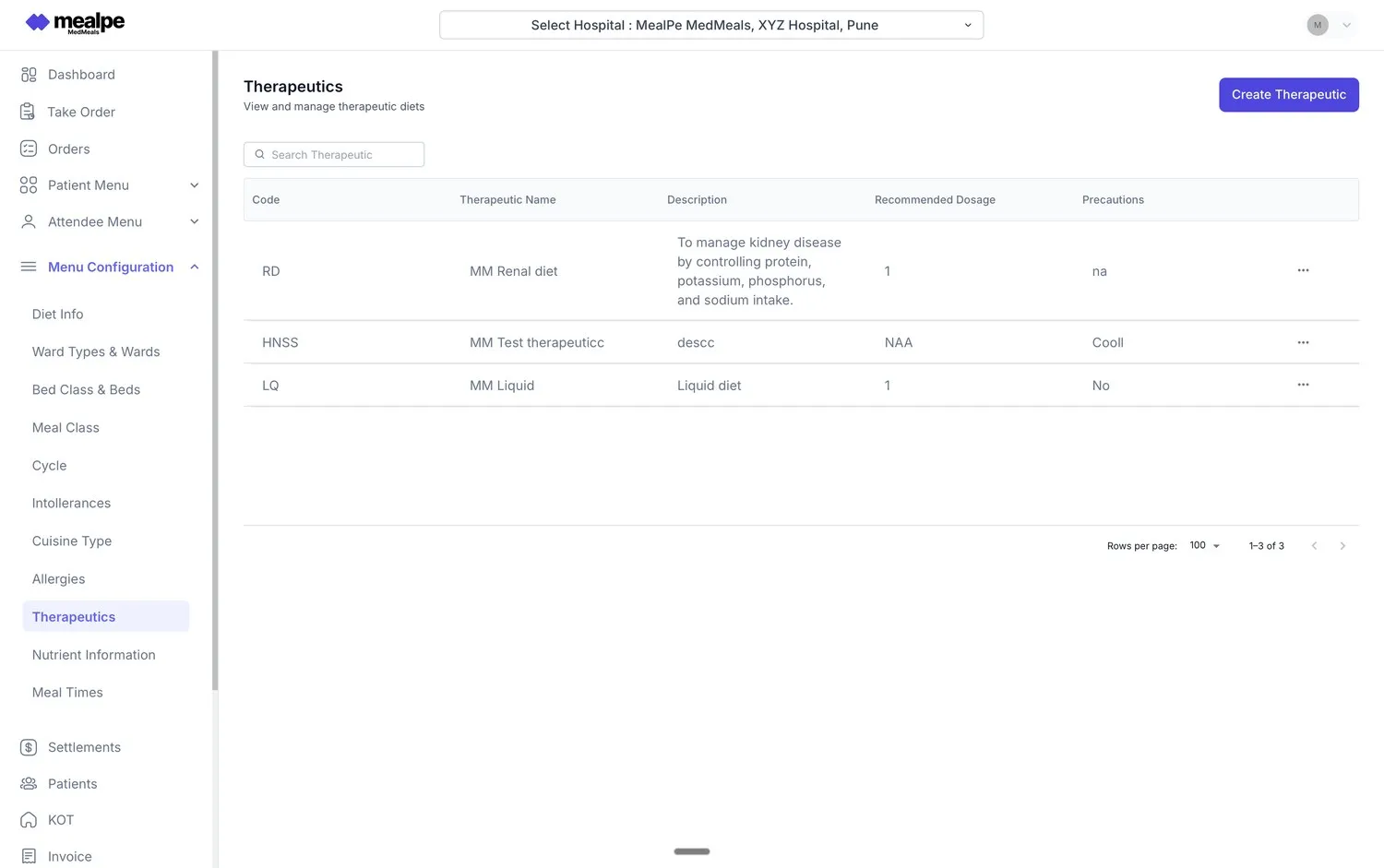
The therapeutics master holds every diet your hospital uses, with its description, recommended use and precautions. Dietitians maintain it, and the menu engine applies it to every patient on that diet.

  • Renal, cardiac, diabetic, liquid and custom diets
  • Descriptions and precautions stored with each diet
  • Update a diet and future orders follow it
Therapeutics master
Therapeutics master in MedMeals listing renal, liquid and other therapeutic diets with descriptions, dosage and precautions

Therapeutics master

Nutrition and intolerances on every item

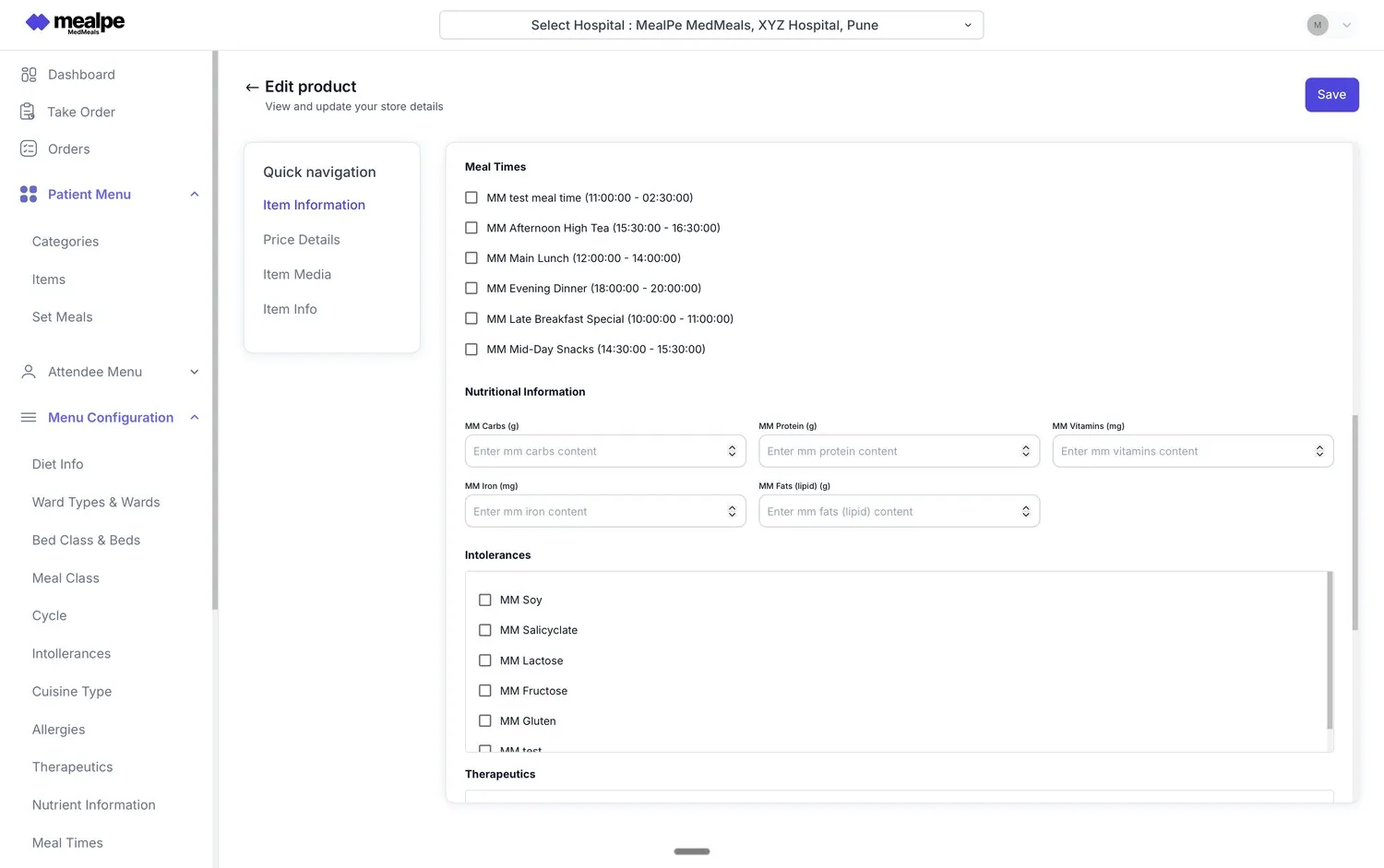
Each menu item carries its meal times, nutritional values, intolerances and the therapeutic diets it suits. That is how the menu knows what to show a patient and what to hide.

  • Calories, protein, carbohydrates, sodium and more
  • Intolerances such as gluten, lactose and soy
  • Meal times set per item
Patient menu configuration
Patient menu item editor in MedMeals with meal times, nutritional information, intolerances and therapeutics

Patient menu item editor

Diet management on paper versus MedMeals

Paper versus MedMeals
Diet management on paper versus MedMeals
Area On paper With MedMeals
Diet order Handwritten, then copied into registers and kitchen slips Recorded once on the patient's digital record
Allergies Remembered by staff, and sometimes missed Hidden from the patient's menu on every channel
Diet change Phoned to the kitchen, often after the meal is plated Updated on rounds, and the next order follows it
Menu planning Rebuilt by hand every week Multi-day cycles that rotate on their own
Audit evidence Scattered across registers and files A complete, exportable diet history for each patient

What changes when the menu enforces the diet

  • 100% diet compliance

    Items that break a patient's diet are never on that patient's menu, so they cannot be ordered, cooked or delivered to them.

  • Fewer meal-service errors

    Nothing is copied between registers and slips, which means fewer wrong trays and fewer missed allergies.

  • Rounds spent on patients

    Dietitians set rules once instead of checking every slip, and spend their rounds on assessment and counselling.

  • Audit-ready records

    Every diet order, change and delivered meal is logged, ready for NABH and internal audits.

Questions buyers ask

Still have a question? Ask our team or call +91 79845 98296.

What is hospital diet management software?

Hospital diet management software records each inpatient's diet order, including the therapeutic diet, texture and allergies, and applies it to every meal. In MedMeals the diet drives the menu itself, so patients, families and staff only see items the patient is allowed to eat.

Which therapeutic diets does MedMeals support?

Hospitals configure their own therapeutic diets in the therapeutics master, for example renal, cardiac, diabetic, liquid and soft diets, each with a description and precautions. Menu items are tagged with the diets they suit, and the menu engine applies those rules for each patient.

How are food allergies and intolerances handled?

Allergies and intolerances are recorded on the patient's record. Any menu item that contains them is hidden from that patient's menu on every ordering channel, including the RSOT tablet, the attendee app and admin ordering.

Can a dietitian change a diet in the middle of the day?

Yes. The dietitian updates the diet on the patient's record and future orders follow the new diet. Kitchen and nursing teams receive diet-change alerts in real time.

Does MedMeals support rotating menus?

Yes. You can plan multi-day diet cycles across meal slots, so long-stay patients get variety while every item still satisfies their diet.

Does the diet follow a patient who changes beds?

Yes. When a patient is transferred, the diet profile moves with them to the new ward and bed, so the next meal is still correct.

See your own diets running in MedMeals

Book a demo and bring your diet list. We will walk you through how your protocols map to the menu engine, ward by ward.

Demo request Reply within one working day

Request a personalized demo

Your role (tick one)

We will only use your details to arrange the demo. See the privacy policy.