Tray status Bed 12

Meal tray tracking with OTP-verified delivery and clearance

Every order in MedMeals moves through six live statuses, from placed to cleared. A delivery OTP confirms the tray reached the right bed, a second OTP confirms it was collected, and a QR code on each order lets staff update its status with one scan.

Status
Delivered
Delivery OTP
Verified at the bedside
Clearance OTP
Awaiting tray pickup
QR code
Scanned by delivery staff

Once a tray leaves the kitchen, nobody can see it

In most hospitals the kitchen's responsibility ends at its door and the ward's begins at the bed, and nothing records the journey in between. Trays wait on trolleys in corridors, reach a bed after the patient has been moved, or sit on a bedside table while the patient is away for a scan.

When a family says the food never came, there is nothing to check it against. Used trays stay in rooms for hours because nobody is told to collect them, and the kitchen starts the next meal short of trays.

Meal tray tracking from the kitchen to clearance

Every order carries its own status, OTPs and QR code, so each tray can be followed and confirmed at every handoff.

  • Six statuses, pushed live

    Every order moves through placed, accepted, preparing, ready, delivered and cleared, and each change is pushed in real time to the people who need to know.

  • Delivery OTP at the bedside

    A one-time code confirms the handover at the bed before the order is marked delivered, showing the tray reached the patient it was meant for.

  • A second OTP at tray clearance

    A separate clearance OTP confirms that the used tray has been collected from the patient's room, and only then is the order closed.

  • A QR code on every order

    Kitchen and delivery staff scan the order's QR code to move it to its next status, instead of looking it up on a screen or calling it in.

  • Alerts to everyone involved

    Patients, kitchen, nursing and admin are notified when an order changes state, so the ward knows when a tray is ready and when it has arrived.

  • Status families can see

    Attendees and families follow the order in the app, from the moment it is placed until the tray is cleared.

  • A record of every handoff

    Status changes and OTP confirmations are logged, so a question about a late or missing meal is answered from the record, not from memory.

The life of a tray, status by status

  1. Step 1: Placed

    The order is placed from a bedside tablet, the app or the admin desk, and carries its QR code and OTPs from the start.

  2. Step 2: Accepted

    The kitchen accepts the order, by hand or through auto-accept, and the family sees the change in the app.

  3. Step 3: Preparing and ready

    Staff move the order to preparing and then to ready from the queue, or with a scan of its QR code.

  4. Step 4: Delivered

    At the bed, the delivery OTP confirms the handover and the order is marked delivered.

  5. Step 5: Cleared

    When the used tray is collected, the clearance OTP confirms it and the order is complete.

What the patient or attendee sees

The order screen in the app puts the delivery OTP and the clearance OTP at the top, then a live timeline of the six stages with a short note for each, down to the tray being collected from the room.

  • Order OTP and clearance OTP on one screen
  • Placed, accepted, preparing, ready, delivered, cleared
  • Order type, items and total below the timeline
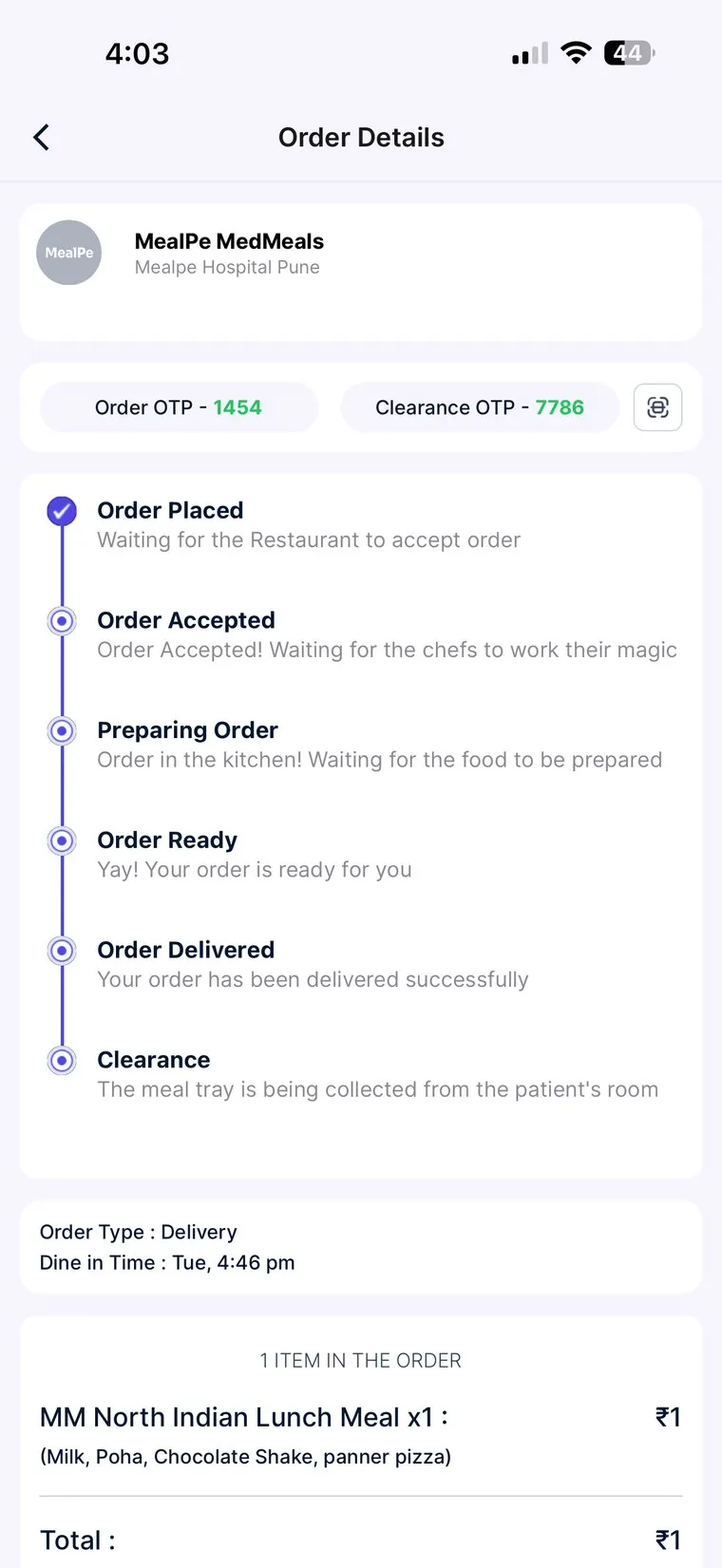
MedMeals app order details with order OTP, clearance OTP and a live status timeline from order placed to clearance

Live order tracking with both OTPs

Built for the walk from kitchen to bed

Hospital trays travel further than restaurant plates: along corridors, into lifts and across wings. A QR scan at each handoff and an OTP at the bed turn that walk into a chain of confirmed steps, with alerts to the ward as the tray moves.

  • One scan to update status
  • OTP at delivery and again at clearance
  • Alerts to nursing and admin as status changes
Steel compartment meal tray with roti, sabzi, paneer and a sweet, seen from above

One tray, one order, one bed

Tray delivery without tracking versus MedMeals

Paper versus MedMeals
Tray delivery without tracking versus MedMeals
Area On paper With MedMeals
Leaving the kitchen No record once the trolley leaves Marked ready in the queue or with a QR scan
Handover Tray left on the table, with no confirmation Delivery OTP confirmed at the bed
Missing meal complaints Staff memory against the family's word Order status and OTP on record
Tray collection Used trays left in rooms for hours Clearance OTP when the tray is collected
Ward updates Nurses call the kitchen to ask Alerts as each order changes state
Family No idea when the food will come Live status in the app

What changes when every tray is tracked

  • Fewer meal-service errors

    Each handover is confirmed with the order's own OTP, so a tray at the wrong bed is caught at the bedside instead of after the meal.

  • Proof of delivery

    Delivered and cleared are both confirmed by OTP and logged, so every tray has an answer to where it went.

  • Trays come back

    Clearance is its own step with its own OTP, so used trays are collected instead of forgotten in rooms.

  • Fewer calls between ward and kitchen

    Live status and alerts answer the question of where a tray is, before anyone picks up the phone.

Questions buyers ask

Still have a question? Ask our team or call +91 79845 98296.

What is meal tray tracking in a hospital?

Meal tray tracking follows each patient's tray from the kitchen to the bed and back. In MedMeals every order moves through placed, accepted, preparing, ready, delivered and cleared, with an OTP to confirm delivery and another to confirm the tray was collected.

How does the delivery OTP work?

Each order has a one-time delivery code. When the tray reaches the bed, the code confirms the handover and the order is marked delivered, which shows the tray reached the patient it was meant for, not just the ward.

Why is there a second OTP for tray clearance?

Collecting the used tray is a separate job, often done by different staff at a different time. The clearance OTP confirms the tray has been collected, so the order is only closed once the room is clear.

What does the QR code on each order do?

Kitchen and delivery staff scan it to update the order's status in one step, for example when the tray is ready, instead of searching for the order on a screen.

Who is notified when an order changes status?

Patients, kitchen, nursing and admin receive real-time alerts as an order changes state. Families and attendees can also follow the live status in the app.

Can we check what happened to an order after the fact?

Yes. Status changes and OTP confirmations stay with the order, and audit logs can be exported, so a question about a late or missing meal can be checked against the record.

Follow a tray from the kitchen to clearance

Book a demo and we will place an order, move it through every status and close it with both OTPs, the way it would run on your wards.

Demo request Reply within one working day

Request a personalized demo

Your role (tick one)

We will only use your details to arrange the demo. See the privacy policy.