Meals served This month

Hospital food service reports for compliance, cost and audits

MedMeals reports on the meals you serve: consumption, diet compliance and meals served by ward, diet or period, alongside forecast against actual, waste and cost trends, revenue and settlements. Audit logs are ready to export when NABH or internal auditors ask.

Grouped by
Ward, diet or period
Compliance
Diet orders followed
Kitchen
Forecast against actual
Audit
Logs ready to export
Admin dashboard
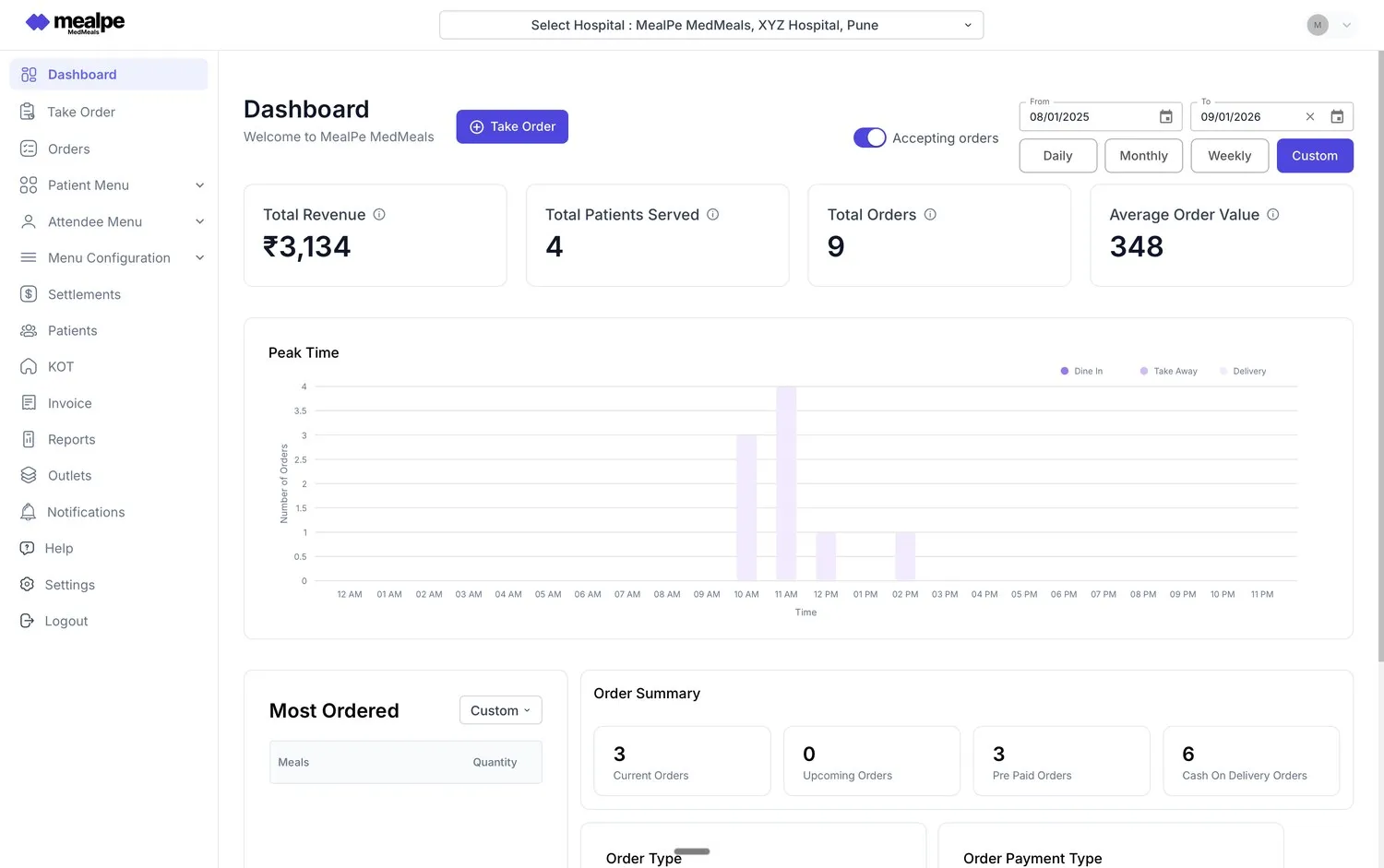
MedMeals dashboard with daily, weekly and monthly filters, order summary and peak-time chart

Dashboard with a custom date range and order summary

Food service numbers live in registers nobody adds up

Ask a hospital how many therapeutic meals it served last month, or how much food came back uneaten, and the answer usually starts with a register. Meal counts sit in kitchen books, diet orders in ward files and money in the billing system. Pulling them together takes days and still leaves gaps.

The same gap shows up at audit time. An NABH assessor asks for evidence that diet orders were followed and meals reached patients, and the quality team goes looking through files. Without a record of every order, the answers are estimates.

Reports built from every order, not from registers

Every order, diet and payment already flows through MedMeals, so reporting is a view of data you have, not a separate job.

  • Meal consumption reports

    See what was ordered and served by ward, by diet or by period, and plan menus around real demand instead of habit.

  • Diet compliance reports

    Report diet compliance across wards and periods. Unsafe items are hidden at order time, so the report shows compliance that was enforced, not just checked afterwards.

  • Forecast versus actual

    Compare the meals the kitchen planned for with the meals actually ordered, so production can be matched more closely to demand.

  • Waste and cost trends

    Track food waste and cost as trends over time, so a rise is spotted early instead of at the year-end budget review.

  • Financial reports

    Revenue, outstanding amounts and settlements in one place, across patient, attendee and department billing.

  • Exportable audit logs

    Logs of orders, diet changes, deliveries and billing events export for NABH assessments and internal audits.

  • A live dashboard

    The admin dashboard shows revenue, patients served, orders and average order value for a day, week, month or custom range, with a chart of orders by hour and the most-ordered meals.

From daily orders to audit-ready reports

  1. Step 1: Orders are captured

    Every order from every channel is recorded with the patient, bed, diet, meal slot and price.

  2. Step 2: Service is confirmed

    Delivery and clearance OTPs confirm that each meal reached the bed and that the tray came back.

  3. Step 3: Reports draw on the records

    Consumption, compliance, waste, cost and financial reports use the same records, by ward, diet or period.

  4. Step 4: Teams review what matters to them

    Dietitians check compliance, the kitchen compares forecast with actual, and finance follows revenue and settlements.

  5. Step 5: Audits get evidence

    Audit logs are exported for NABH assessments and internal audits, without pulling registers from every department.

An audit trail that builds itself

Every order, diet change, delivery confirmation and payment is logged with a timestamp as it happens. When an auditor asks how a diet order was followed, you export the record instead of searching through files.

  • Orders, diet changes, deliveries and billing events
  • Exportable for NABH and internal audits
  • Protected by role-based access

The right numbers for each team

Dietitians look at diet compliance, kitchen managers at forecast against actual and waste, finance at revenue, outstanding amounts and settlements, and leadership at all of it. Role-based access decides who can see what.

  • Diet compliance for dietitians
  • Forecast, waste and cost for the kitchen
  • Revenue and settlements for finance
Administrator reviewing reports on a laptop at an office desk

Reports for the teams that answer for food service

Food service reporting on paper versus MedMeals

Paper versus MedMeals
Food service reporting on paper versus MedMeals
Area On paper With MedMeals
Meal counts Tallied from kitchen registers Counted from every order, by ward, diet or period
Diet compliance Sampled by hand before an audit Reported from the orders themselves
Food waste Guessed from what comes back Tracked as a trend over time
Revenue Pieced together from receipts Revenue, outstanding and settlements in one place
Audit evidence Files pulled from several departments Audit logs exported on request

What changes when every meal is on record

  • A complete digital audit trail

    Every order, diet change, delivery and payment is logged, so the evidence exists before anyone asks for it.

  • Compliance you can show

    Diet rules are enforced at the menu and reported from the orders, which turns 100% diet compliance into something you can demonstrate.

  • Production matched to demand

    Forecast against actual and waste trends show where the kitchen cooks more than is ordered, so menus and quantities can be adjusted.

  • One set of numbers

    The kitchen, dietitians and finance read from the same records, so reviews start from agreed figures.

Questions buyers ask

Still have a question? Ask our team or call +91 79845 98296.

What reports does MedMeals provide for hospital food service?

Meal reports (consumption, diet compliance and meals served by ward, diet or period), operational analytics (forecast versus actual, waste and cost trends), financial reports (revenue, outstanding amounts and settlements) and exportable audit logs.

How is diet compliance reported?

Every order is tied to the patient's diet on record, and items that break the diet are hidden when the order is placed. Diet compliance reports then show how diet orders were followed across wards, diets and periods.

Can MedMeals help us cut food waste?

MedMeals tracks waste and cost trends and compares forecast with actual orders, so kitchen teams can see where production runs ahead of demand. Decisions about menus and quantities stay with your kitchen and dietitians.

Do the audit logs support NABH assessments?

MedMeals supports NABH documentation. Logs of orders, diet changes, deliveries and billing events can be exported for NABH assessments and internal audits. Accreditation itself depends on the hospital's own processes and assessment.

Can reports be exported?

Yes. Audit logs and transaction records are exportable, so finance, quality and administration teams can work with them in the tools they already use.

Which events trigger real-time alerts?

Order, diet-change, delivery and billing events trigger real-time alerts to the people involved: patients, kitchen, nursing and admin. Problems are seen as they happen, not at month end.

See your food service in numbers

Book a demo and we will open the dashboard, a diet compliance report and an exported audit log, using sample data shaped like your wards.

Demo request Reply within one working day

Request a personalized demo

Your role (tick one)

We will only use your details to arrange the demo. See the privacy policy.