Hospital setup Masters

Hospital meal system configuration that matches how your hospital runs

Model your buildings, wards, floors, rooms and beds, your diet labels and meal types, your kitchens and service points, and the roles of every team. Set it up once, and every order, KOT, bill and report works from the same masters.

Layout
Buildings, wards, floors, beds
Labels
Diets, meal types, categories
Facilities
Kitchens, canteens, service points
Roles
Dietitian, kitchen, nursing, billing

Every hospital is built differently

No two hospitals share a floor plan or a diet list. One runs a single tower with a diet kitchen in the basement. Another spreads across three buildings with a canteen, an outside vendor and wards that call the same diet by different names. A meal system that assumes one layout forces workarounds on everyone.

Access is the other half of the problem. Dietitians should change diets, kitchens should see orders, billing should see charges, and nobody should see more patient data than their job needs. Shared logins and spreadsheets make that impossible to control or to audit.

Masters that every module reads from

Configuration in MedMeals is done during rollout and maintained by your own admins afterwards. Every ordering channel, kitchen queue and report uses it.

  • Buildings, wards, floors, rooms and beds

    Model the hospital as it is built, down to the bed, so every order carries an exact delivery address.

  • Your own labels and taxonomies

    Create the diet labels, meal types, food categories and tags your teams already use, so the system speaks your hospital's language.

  • Kitchens, canteens, vendors and service points

    Register every facility that cooks or serves food, so orders and KOTs can be routed to the right place.

  • Roles and permissions

    Give dietitians, kitchen staff, nursing, admin and billing teams their own roles, each with the screens and actions their work needs.

  • Granular, audited access

    Access is role-based and actions are recorded in full audit logs, so you can show who changed a diet or an order, and when.

  • Meal times as shared lists

    Define each meal time once with its serving window, such as a main lunch from 12:00 to 14:00, and attach menu items to the times they are served.

  • Clinical masters for the menu engine

    Therapeutic diets, allergies, intolerances and nutrient information are kept as masters that the menu engine applies to every patient.

How a hospital gets configured

Configuration is the second of five rollout steps. It follows Discovery, where your wards, diets, kitchens and workflows are mapped.

  1. Step 1: Map the hospital

    In Discovery, your onboarding manager maps your buildings, wards, beds, diets, kitchens and ordering workflows.

  2. Step 2: Load the masters

    Facilities, beds, diet labels, meal types and food categories are set up to match what was mapped.

  3. Step 3: Build diets and menus

    Therapeutic diets, nutrient data, allergies and meal windows are configured, then patient and attendee menus are built on top.

  4. Step 4: Assign roles

    Each team gets roles and permissions that fit its work, from dietitians to the billing desk.

  5. Step 5: Train and go live

    Every team is trained hands-on, and go-live is phased with on-site and remote support.

Every master under one configuration menu

Masters live in one menu, so admins always know where to look. Diet info, ward types and wards, bed classes and beds, meal classes, cycles, intolerances, cuisine types, allergies, therapeutics, nutrient information and meal times are each kept as a list your team maintains.

  • Wards and beds, meal times and cycles
  • Allergies, intolerances and nutrient information
  • Therapeutic diets with descriptions and precautions
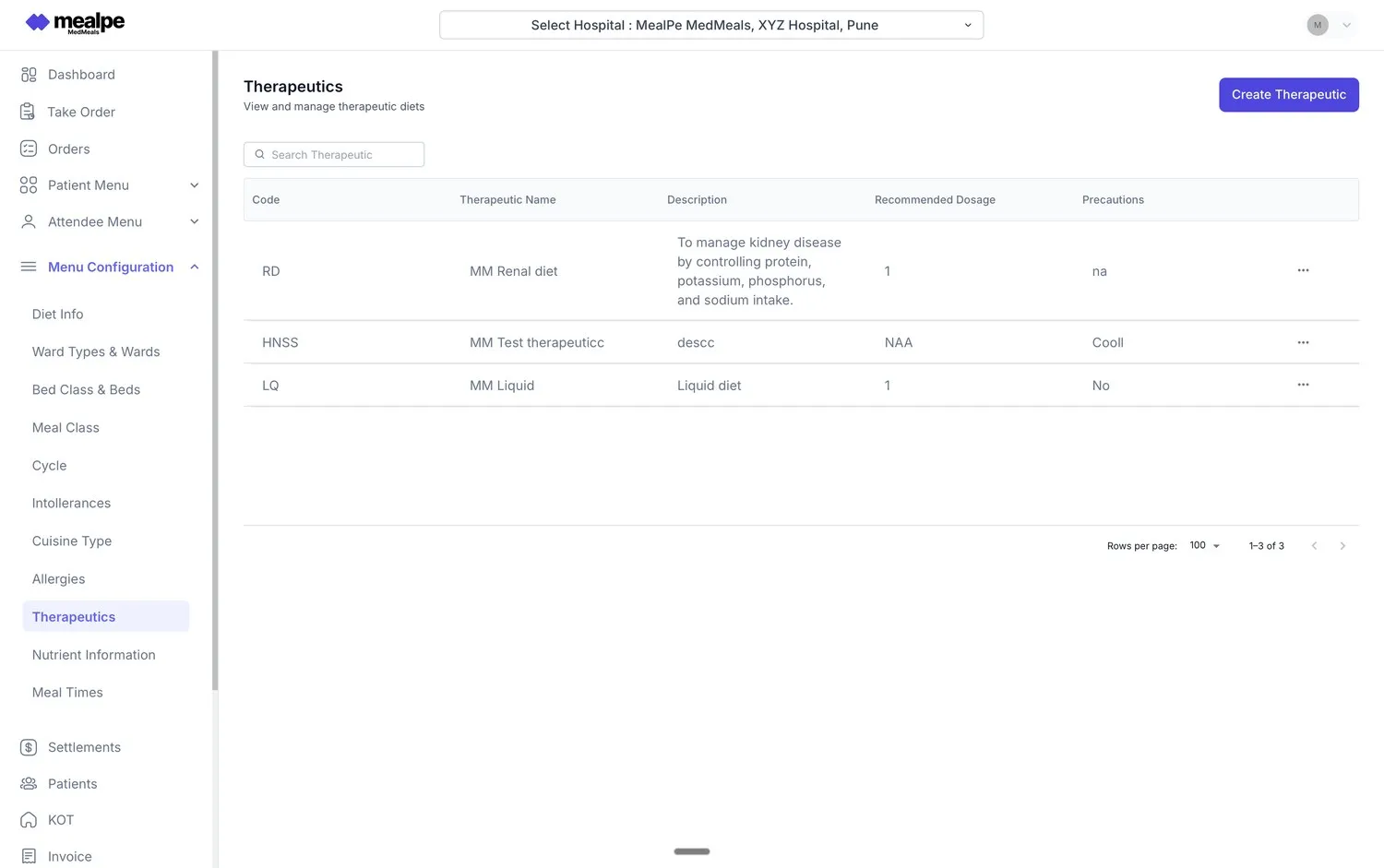
Therapeutics master
Therapeutics master in MedMeals listing renal, liquid and other therapeutic diets with descriptions, dosage and precautions

The configuration menu beside the therapeutics master
Menu items that pick from your masters

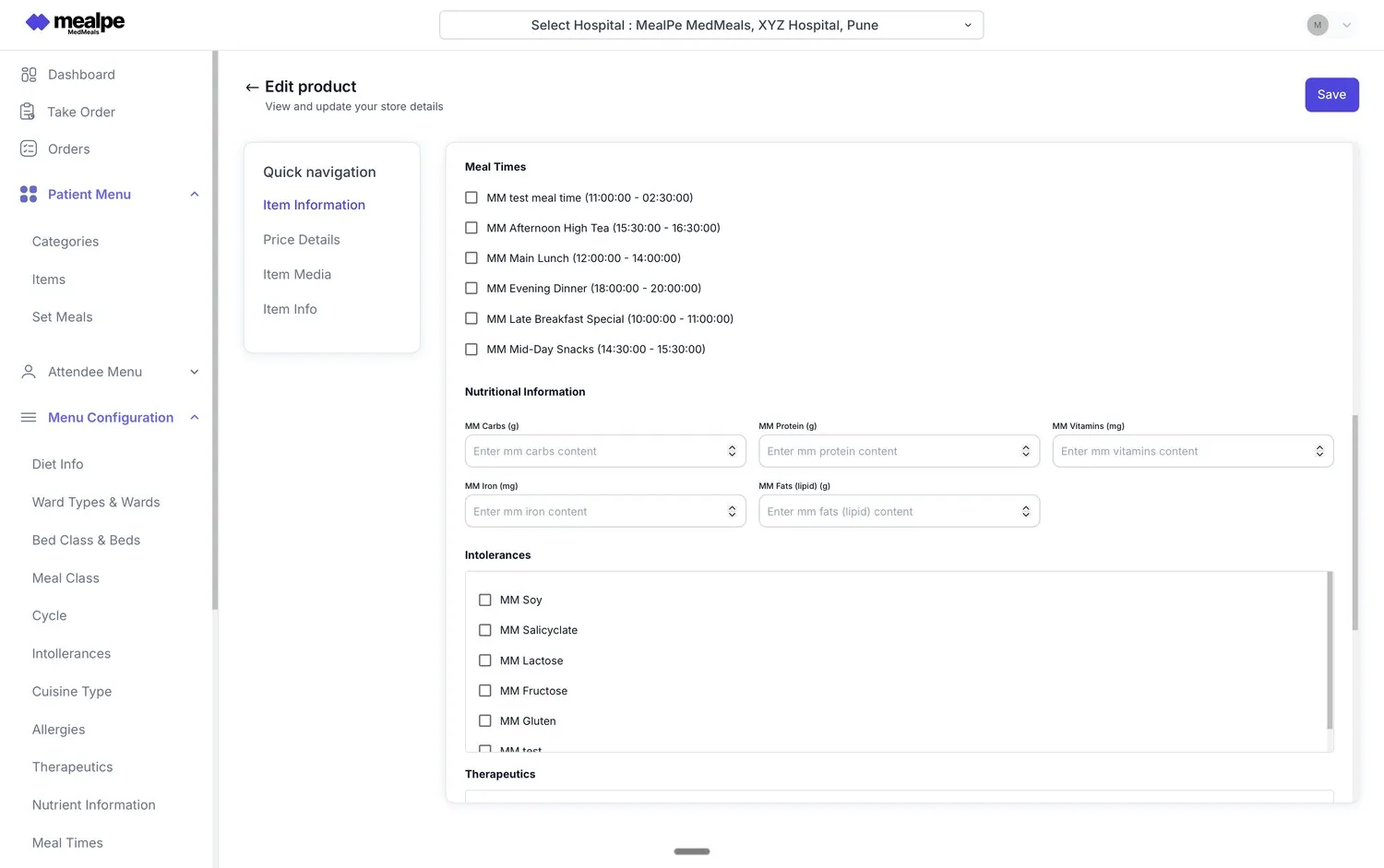
When the team adds an item to the patient menu, they select the meal times it is served in and the intolerances it carries, and fill in the same nutrient fields as every other item. Because every item uses the same lists and fields, the menu engine can rely on them.

  • Meal times shown with their clock windows
  • Nutrient fields such as carbs, protein, iron and fats
  • Intolerances picked from one hospital-wide list
Patient menu configuration
Patient menu item editor in MedMeals with meal times, nutritional information, intolerances and therapeutics

Menu item editor drawing on the meal time and intolerance masters

Hospital setup by spreadsheet versus MedMeals

Paper versus MedMeals
Hospital setup by spreadsheet versus MedMeals
Area On paper With MedMeals
Wards and beds Spreadsheets that go stale after every renovation Buildings to beds kept as masters
Diet names Different names on different wards One set of diet labels across the hospital
Kitchens Orders sent to whoever answers the phone Kitchens and service points registered for routing
Access Shared logins and passwords on sticky notes Role-based access for every team
Changes No record of who changed what Full audit logs of actions taken

What changes when setup is done properly

  • One source of truth

    Every module reads from the same masters, so a bed, a diet or a kitchen means the same thing everywhere.

  • Access that fits the job

    Each team sees and does only what its role allows, which keeps patient data with the people who need it.

  • Changes on the record

    Actions are captured in audit logs, adding to a complete digital audit trail for NABH and internal audits.

  • Room to grow

    New wards, beds, diets and kitchens are added as masters when the hospital grows, on the same platform.

Questions buyers ask

Still have a question? Ask our team or call +91 79845 98296.

What does hospital meal system configuration involve?

It means setting up the masters a meal system runs on: buildings, wards, floors, rooms and beds; diet labels, meal types, food categories and tags; kitchens, canteens, vendors and service points; and roles and permissions for each team. In MedMeals this is the Configuration step of rollout.

Can we use our own diet names and categories?

Yes. Diet labels, meal types, food categories and tags are all custom, so wards and kitchens see the names your hospital already uses.

Which roles can we set up?

Roles cover dietitians, kitchen staff, nursing, admin and billing teams. Permissions are granular and role-based, so each role only sees and changes what its work requires.

Are changes recorded?

Yes. MedMeals keeps full audit logs alongside role-based access, so actions on diets, orders and billing can be traced for NABH and internal audits.

Who does the configuration, us or MealPe?

Both. During rollout, a dedicated onboarding manager works with your teams through Discovery and Configuration to set up masters, menus, labels and roles. After go-live your admins maintain them, with account management and a helpdesk behind them.

Can one setup cover several buildings and kitchens?

Yes. Buildings, wards, floors, rooms and beds are modeled as masters, and every kitchen, canteen, vendor and service point is tracked, so a campus with several buildings runs on one configuration.

Map your hospital into MedMeals

Book a demo and share your ward list, diet list and kitchen setup. We will show how they become masters, and what rollout looks like from Discovery to go-live.

Demo request Reply within one working day

Request a personalized demo

Your role (tick one)

We will only use your details to arrange the demo. See the privacy policy.