



MedMeals diet card A product by MealPe

Patient meal management software, from diet order to bedside.

MedMeals runs your hospital's entire meal service on one secure platform: clinically safe menus, bedside ordering on tablets, kitchen KOTs, OTP-verified delivery and billing. The right diet reaches the right bed, every meal.

Diet order
Set once by the dietitian
Menu
Unsafe items hidden
Delivery
OTP at the bedside
Billing
Straight to the final bill
A product by MealPe

Built by MealPe, the operating system for institutional food services.

MealPe already runs cafeterias, messes and food courts across India. Its platform has processed 10 lakh+ meals across 20+ campuses with 100+ food vendors. MedMeals brings that engine to the hospital ward.

Supported by
  • GCCI Elevate Startups
  • Startup India Seed Fund grantee
  • ISB i-Venture
  • Wadhwani Foundation

Meal management shouldn’t run on paper.

Manual meal operations cost your hospital in safety, satisfaction, staff time and money every single day. Here is a typical morning in a diet register.

  1. Diet errors reach the bedside

    Handwritten orders and verbal handoffs get copied from register to slip to tray. A renal diet that becomes regular by the third copy is a clinical safety hazard.

  2. Malnutrition goes unnoticed

    Nobody records what came back on the tray. Without intake tracking, at-risk patients slip past rounds, which extends stays and raises re-admissions.

  3. Food waste and cost leak

    Kitchens cook for yesterday’s census and send trays twice. With no demand forecast, food cost inflates and nobody can see where it goes.

  4. No audit trail

    When the record lives in three registers and a night book, NABH documentation, billing reconciliation and consumption audits become slow and error-prone.

Every one of these is a daily, repeating cost, and every one is solvable with the right system. See how a meal moves in MedMeals.

Diet register Ward 4B 12/9 morning
An illustrative paper diet register with copying errors (sample)
Bed Patient Diet order Remarks
4 R. Kumar Diabetic ok
7 S. Mehta Soft tray back full, not noted
12 A. Khan Regular Renal copied from night register
15 P. Iyer Regular allergy? ask family
21 M. Das NPO till 2 pm, then soft?
23 J. Shah Diabetic extra tray sent x2

rest in other book

Illustration of a paper diet register. Names and entries are samples.

Follow one meal from diet order to cleared tray.

Every MedMeals order passes the same six checkpoints, whether it starts at the bedside, on a family member’s phone or at the admin desk. Scroll to watch the card fill in.

  1. The dietitian sets the diet once.

    A renal, low-sodium order with a peanut allergy goes on the patient’s record. Every menu, cycle and meal slot now follows it.

    Diet management
  2. The menu hides what is unsafe.

    Items that break the diet or contain an allergen never appear, so staff, the patient or family cannot order them.

    Patient nutrition management
  3. The order is taken at the bedside.

    On ward rounds, staff take the order on a tablet (RSOT). Families can also order from their phones, and admins in bulk.

    Bedside ordering (RSOT)
  4. The kitchen gets a clean KOT.

    Every order lands in one queue and prints as a consolidated KOT and meal card, routed to the right kitchen station.

    Kitchen and KOTs
  5. Delivery is verified at the bed.

    A delivery OTP confirms the right tray reached the right patient. Nursing and the patient see the status change live.

    Tray tracking
  6. The tray is cleared and billed.

    A second OTP closes the loop at clearance, and the meal charge rolls into the final bill or the attendee’s invoice.

    Billing and invoicing

Seven modules. One patient record.

Every module shares one patient record, one menu engine and one order pipeline, from setup to settlement. Nothing is re-typed between departments.

  1. Masters and configuration
  2. Patient and attendee menus
  3. Ordering channels
  4. IPD patient management
  5. Kitchen operations
  6. Billing and invoicing
  7. Reports and notifications
See every feature
Masters and configuration Setup

Configure your entire hospital, once.

Model your exact facility structure, labels and operating rules before day one, so every other module inherits them.

  • Buildings, wards, floors, rooms and beds
  • Your own diet labels, meal types and tags
  • Kitchens, canteens, vendors and service points
  • Role-based access for every team
Setup and roles
Therapeutic diets
Therapeutic diet master in MedMeals listing a renal diet, for managing kidney disease, and a liquid diet
Patient and attendee menus Menu engine

Clinically intelligent menus.

Patient menus that understand nutrition and therapy, plus separate paid menus for attendees and visitors.

  • Calories, protein, carbs and sodium per item
  • Renal, cardiac, diabetic and custom diets
  • Allergies auto-hidden for each patient
  • Multi-day cycles and meal windows
Diet management
Menu item intolerances
Intolerances checklist on a MedMeals menu item: soy, salicylate, lactose, fructose and gluten
Ordering channels Four doors

Every way to place a meal order.

One order pipeline with four front doors, so every patient, attendee and staff member orders the way that suits them.

  • RSOT: bedside orders on tablets during rounds
  • Attendee app for visitors and caretakers
  • Online ordering from any device
  • Admin ordering in bulk for wards
Bedside ordering
RSOT order details
RSOT order screen in MedMeals: the order steps, delivery date chips starting today, and the main lunch meal time
IPD patient management Inpatients

A complete view of every inpatient.

Onboard, track and manage each admitted patient, with full detail linked directly to their meals and diet.

  • Admission, ward, bed and diet orders in one record
  • Manual onboarding or HIMS sync
  • Diet profile carried across bed transfers
  • Hold meals, update diets, discharge
IPD patient management
Kitchen operations Diet kitchen

From orders to the kitchen floor.

Orders flow straight into production documents your kitchen already understands, printed or on screen.

  • Daily meal cards per patient and slot
  • Consolidated KOTs routed to each station
  • Accept, prepare and print from one queue
  • Dispatch tracked through delivery
Kitchen and KOTs
Kitchen order queue
MedMeals kitchen order queue with its pending, current and live tabs and the current orders list
Billing and invoicing Settlement

Every meal accounted for.

Meal-level billing flows into clean invoices and settlement, for patients, attendees and hospital accounts alike.

  • Itemized invoices from actual orders
  • Hospital billing, UPI, cards and cashless
  • Charges rolled into the final bill
  • Every transaction logged and exportable
Billing and invoicing
Patient billing
MedMeals patient billing summary with 24 total orders and 8,130 rupees total billing, and a recent cash order for a North Indian lunch meal
Reports and notifications Insight

Insight and alerts, in real time.

Turn every order into actionable data, and keep every team informed the moment something needs attention.

  • Consumption and diet compliance by ward
  • Forecast versus actual, waste and cost
  • Exportable logs for NABH and audits
  • Live alerts to kitchen, nursing and admin
Reports and analytics
Admin dashboard
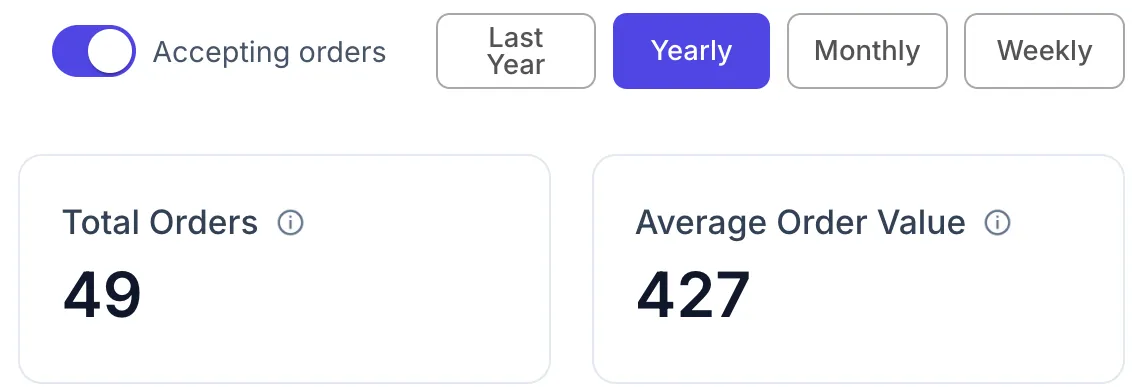
MedMeals dashboard with the accepting orders switch, yearly, monthly and weekly filters, total orders and average order value

Four front doors. One pipeline.

Staff order at the bedside, attendees order and pay from their phones, families order ahead online, and admins place orders for whole wards. Whichever door an order comes through, it lands in the same queue, the same kitchen and the same dashboard, always against the patient’s compliant menu.

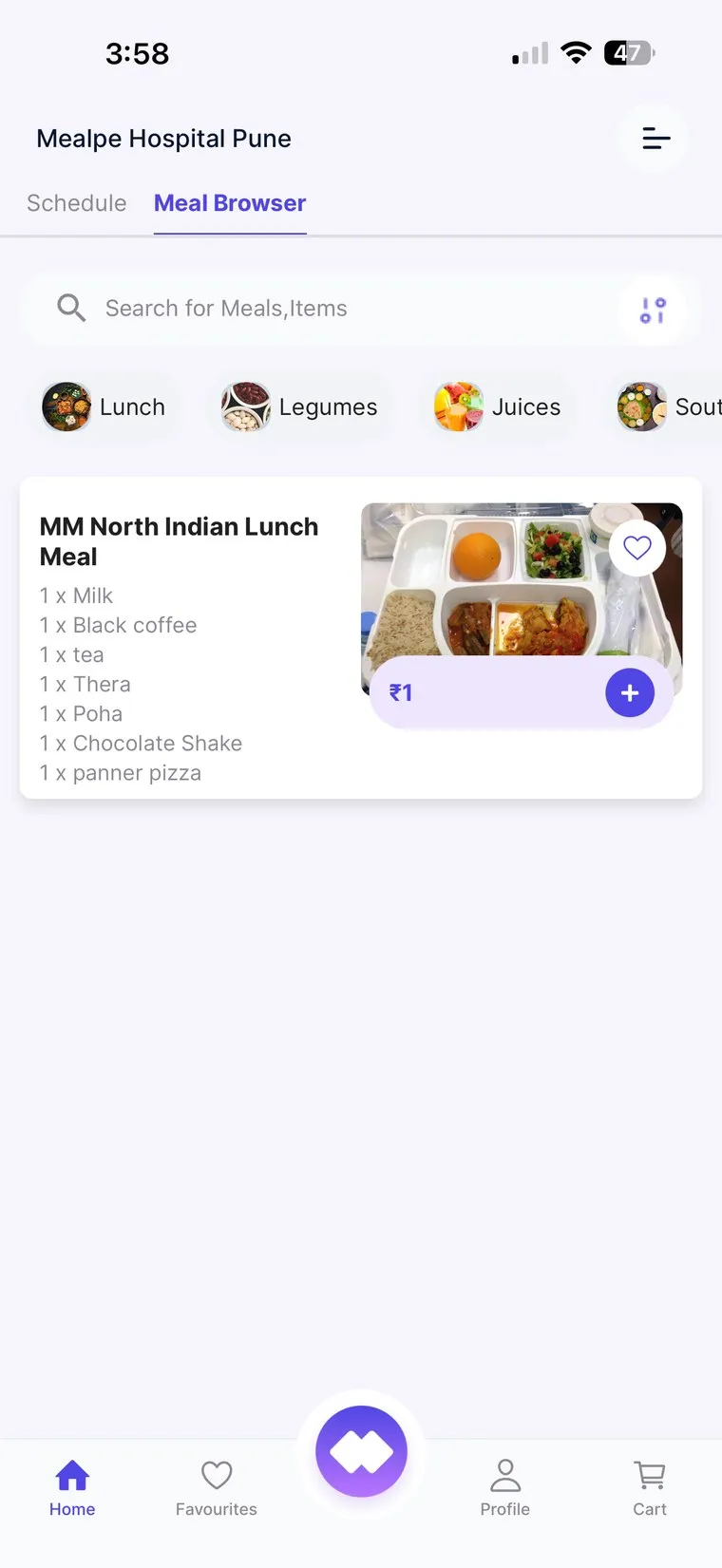
MedMeals patient and attendee app showing the meal browser with categories and a North Indian lunch meal
Meal browser
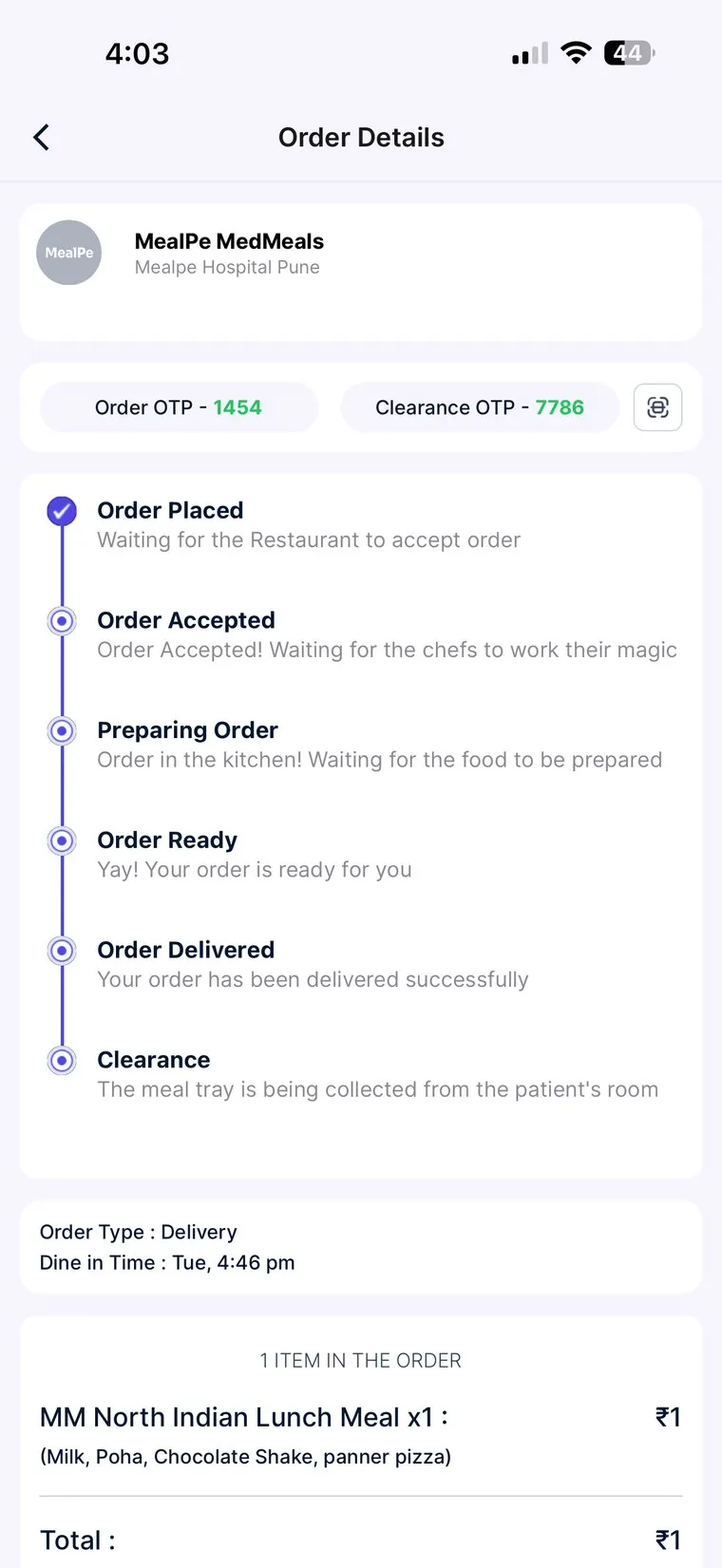
MedMeals app order details with order OTP, clearance OTP and a live status timeline from order placed to clearance
Live tracking with OTPs

Sample data

Sample orders

What changes on the ward, in the kitchen and at the billing desk.

100% diet compliance, by design.

Not because staff try harder, but because items that break a patient’s diet are never on that patient’s menu, on any channel.

Safety

Fewer meal-service errors

No copying between registers, slips and trays, so fewer wrong diets and missed allergies.

Workload

Automation where staff lose hours

Meal cards, KOTs and billing are generated from the orders themselves.

Records

A complete digital audit trail

Every order, change, delivery and charge is timestamped and exportable.

Paper versus MedMeals
How hospital meal operations change from paper to MedMeals
Area On paper With MedMeals
Diet orders Handwritten and copied into registers Recorded once on the patient’s record
Menus One printed card for every patient Each patient sees only what is safe for them
Order taking Phone calls and slips from every ward RSOT tablets, attendee app, online and admin
Kitchen Re-typed slips, missed changes Consolidated KOTs and meal cards per station
Delivery No proof the right tray arrived OTP at the bedside, second OTP at clearance
Billing Meal charges chased at discharge Charges roll into the final bill automatically
Audits Registers pulled from three departments Exportable logs for NABH and finance

Live in weeks, not months.

A structured rollout led by our team, with your staff trained and supported at every step. You keep running on paper until each ward is ready to switch.

  1. Step 1: Discovery

    We map your wards, diets, kitchens and workflows with your team.

  2. Step 2: Configuration

    Masters, menus, diet labels and user roles are set up for your hospital.

  3. Step 3: Integration

    MedMeals connects with your HIMS or HMS and your billing systems.

  4. Step 4: Training

    Hands-on sessions for dietitians, nursing, kitchen, billing and admin.

  5. Step 5: Go-live

    A phased launch, ward by ward, with on-site and remote support.

  • A dedicated onboarding manager
  • Sample data migration
  • Parallel-run support
  • Post-go-live optimization

Enterprise-grade trust, around the clock.

Your data stays yours, your systems stay connected, and your teams always have someone to call. Built on the same platform MealPe runs across institutional kitchens in India.

How we protect patient data
Security and support Checklist
  • Data security

    Encryption in transit and at rest, secure cloud infrastructure and regular backups.

  • Role-based access

    Granular permissions and full audit logs, so staff see only what they should.

  • Compliance ready

    Supports NABH documentation and aligns with India’s digital-health data standards.

  • HIMS and HMS integration

    Connects with your HIMS or HMS, so admissions and meal charges flow without re-typing.

  • Dedicated support

    Account management, SLA-backed response and a responsive helpdesk for your teams.

  • Reliability

    A scalable, monitored platform engineered for round-the-clock hospital operations.

Questions hospitals ask us

Straight answers about patient meal management, integration, rollout and compliance.

Still have a question? Ask our team or call +91 79845 98296.

What is patient meal management software?

Patient meal management software digitizes how a hospital plans, orders, prepares, delivers and bills patient meals. It links each patient’s diet order to the menu they can order from, sends orders to the kitchen as KOTs and meal cards, tracks delivery to the bedside and records every charge. MedMeals does all of this on one platform, with separate menus and billing for attendees.

How does MedMeals make sure every patient gets the right diet?

The dietitian records the diet, allergies and texture on the patient’s record once. MedMeals then shows only compliant items on that patient’s menu on every ordering channel, prints the diet on the KOT and meal card, and verifies delivery with an OTP at the bedside.

Can families and attendees order food through MedMeals?

Yes. Attendees and visitors use the attendee app to order and pay for their own meals from a separate paid menu, using UPI or cards. Their orders reach the same kitchen queue, and the patient’s therapeutic plan is never affected.

Does MedMeals integrate with our HIMS or HMS?

Yes. MedMeals connects with your HIMS or HMS. Patients can be onboarded manually or through HIMS sync, and meal charges can roll into the patient’s final bill. The integration approach is agreed with your team during the Integration step of rollout.

How long does it take to implement MedMeals?

Hospitals go live in weeks, not months. The rollout runs in five steps (discovery, configuration, integration, training and a phased go-live), led by a dedicated onboarding manager with sample data migration and parallel-run support.

Does MedMeals help with NABH audits?

MedMeals supports NABH documentation. Every diet order, diet change, delivery and charge is logged with a timestamp, and meal, compliance and audit reports can be exported for accreditation and internal audits.

Which devices does MedMeals run on?

Staff use MedMeals in a web browser on desktops and tablets, including tablets for bedside order taking on ward rounds. Patients, families and attendees order from their phones. Kitchens can work from printed KOTs and meal cards or from screens.

Who builds MedMeals?

MedMeals is built by MealPe, the operating system for institutional food services, headquartered in Ahmedabad. MealPe’s platform has processed 10 lakh+ meals across 20+ campuses with 100+ food vendors.

Bring digital meal management to your hospital.

A ready-to-deploy, clinically developed platform, configured for your facility, integrated with your systems and supported by our team. Tell us about your hospital and we will set up a personalized demo.

Demo request Reply within one working day

Request a personalized demo

Your role (tick one)

We will only use your details to arrange the demo. See the privacy policy.